
The Hero Section is like your first handshake with candidates.
It’s the header of your job page, and the place where you grab attention instantly. A strong hero section sets the tone and makes your vacancy stand out.
You’ll learn how to:
- Add an image to catch the eye.
- Write a tagline that highlights your company’s personality.
- Apply your branding so candidates immediately recognize your company.
Follow along below, on how to complete each section.
1\. Add your opening line e.g. Hi there! We are Hiring!
By default, we always use ‘We are Hiring’. If you wish to keep the same text, no need to write anything.

2\. Include the job title here.

3\. Use this section to add an opening headline to capture the attention of your candidates.

4\. Be transparent, and share the salary range. You have two options here:
- Leave the default option of ‘competitive salary’ text OR
- Select numeric salary, to include the salary range. We recommend sharing the range. Being transparent from the start can help attract the right candidates and reduce time spent in interviews.

5\.

6\. Select the hours the employee will be working in this role.

7\. Include the location of the position. You have three options; remote, hybrid or including the office location.

8\. Update the default image. Add an eye catching image of your office or employees.

9\. If you’d like AI Hirelab to (re)generate this section for you, simply select the magic wand icon.
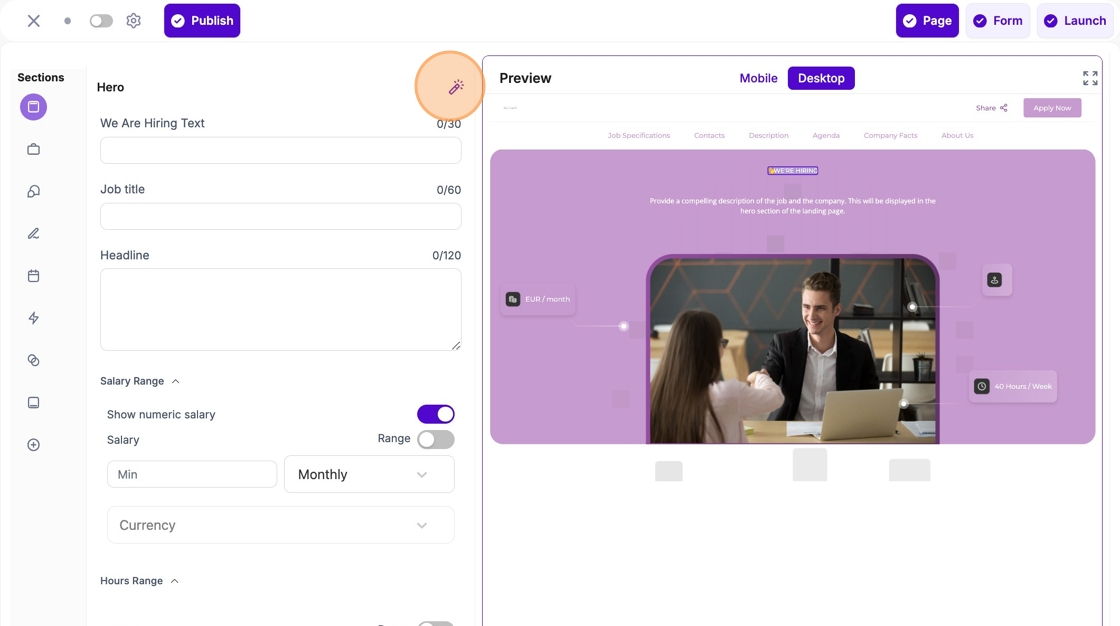
10\. Click the “Describe what you want for the Hero section…” field and let the AI HireLab feature do its work!
