

Temp Agency Software: What to Look For Before You Buy
The right temp agency software moves a worker from application to shift, timesheet, payroll, and invoice without extra steps — if yours can’t, it will slow your agency down.
When I review temp agency software, I focus on a few things first: mobile apply speed, shift coverage, client data separation, timesheet-to-payroll flow, and reporting that shows where delays happen. That matters because 92% of applicants drop off on long forms, smartphone apply rates can be up to 4x higher, and broken back-office workflows can lead to 15% to 25% margin leakage.
Before I buy, I want clear answers to these questions:
- Can candidates apply on mobile in under 60 seconds?
- Can recruiters shortlist and message people from one place?
- Do scheduling, timekeeping, payroll, and invoicing stay connected?
- Are compliance alerts built in for expiring credentials?
- Can each client have its own workspace and data boundaries?
- Do reports show Time to Hire vs. Time to Fill?
- Can I test the system for 14 to 30 days with my own workflow?
- Are API connections, migration steps, audit logs, and export rights clear before I sign?
Here’s the short version: I would not choose based on demo polish or base price alone. I would choose based on workflow fit, manual work removed, mobile conversion, back-office handoff quality, and total yearly cost, including setup, migration, support, and add-ons.
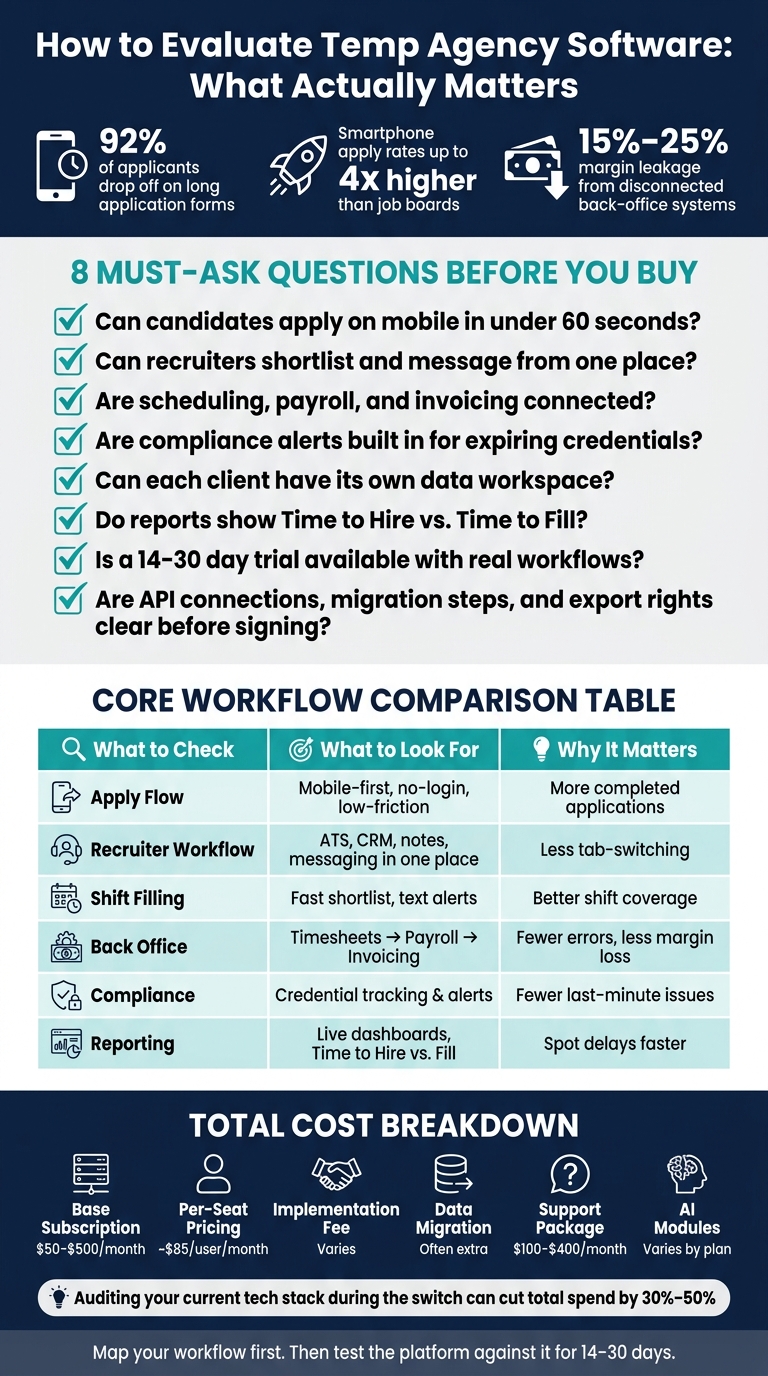
Temp Agency Software: Key Evaluation Criteria & Cost Breakdown
Quick Comparison
| What I check | What I want to see | Why it matters |
|---|---|---|
| Apply flow | Mobile-first, no-login, low-friction form | More completed applications |
| Recruiter workflow | ATS, CRM, notes, and messaging in one place | Less tab-switching and missed follow-up |
| Shift filling | Fast shortlist, availability view, text alerts | Better shift coverage |
| Back office | Signed timesheets flow into payroll and invoicing | Fewer errors and less margin loss |
| Compliance | Credential tracking and alerts | Fewer last-minute issues |
| Reporting | Live dashboards, especially Time to Hire vs. Time to Fill | Easier to spot delays |
| Integrations | Native or API connections to payroll, VMS, portals | Less manual re-entry |
| Security | Role-based access, audit logs, ISO 27001/FedRAMP, export rights | Better control over data |
| Pricing | Full yearly cost, not just subscription | Fewer cost surprises |
If I were buying today, I’d map my process first, then use that map to test each platform against how my team works every day.
Core Functions Temp Agency Software Must Handle Well
Temp staffing runs on speed, and the right staffing agency software features keep sourcing, placement, payroll, and invoicing connected. There’s not much room for clunky handoffs or duplicate data entry, which is why it makes sense to start with the functions that touch every single placement.
Applicant Tracking, CRM, and Candidate Communication in One Workflow
First, check whether candidate, client, and recruiter data stay linked in one staffing agency CRM instead of scattered spreadsheets. Things slow down fast when recruiter notes, candidate profiles, and client job orders sit in separate tools.
You want one system for candidate profiles, notes, and client job orders. When a shift opens, your team should be able to pull a shortlist in seconds, not dig through tabs and spreadsheets. It should also handle text, email, and mobile alerts in the same workflow, with each touchpoint logged on its own. That cuts down on dropped messages and messy follow-ups.
Mobile matters here too. Forms should work well on a phone, and conversational AI can help move people through the apply process with less friction. That matters because smartphone application completion can be up to 4x higher than on old-school job boards [1][2].
Shift Scheduling, Timekeeping, Payroll, and Invoicing Connections
Scheduling, payroll, and invoicing are where temp staffing either stays tight or starts leaking money. When these systems are split apart, errors and delays can lead to 15% to 25% margin leakage [2].
As you review software, make sure shift assignment, availability tracking, signed timesheets, payroll, and invoicing all stay linked without manual re-entry. Ask a plain question: How do signed timesheets move into payroll and invoicing? If the answer sounds messy, that’s a red flag.
The reason is simple. Manual data entry costs an average of $4.86 per entry, so even small breaks in the workflow can add up fast as volume grows.
Mobile Access, Compliance Controls, and Reporting Dashboards
For temps in the field, especially in retail, logistics, and healthcare, mobile access is a must. Candidates should be able to apply through no-login, no-resume-upload mobile flows. They should also be able to use text or conversational AI to handle early screening and scheduling right from their phones. If that flow feels clunky, people drop off before day one.
On the compliance side, look for automation that tracks credential expiration dates and sends alerts before a worker falls out of date. That kind of reminder can save agencies from last-minute chaos when a credential is about to lapse.
Reporting dashboards help you catch bottlenecks before they drag down fills. One of the most useful views is Time to Hire vs. Time to Fill because it shows whether delays are coming from the candidate side or from your own process [3]. That view matters more than it may seem at first glance. Each extra week in the hiring cycle increases cost-per-hire by 10% to 15% [3], so real-time visibility has a direct effect on your bottom line.
Higher-Value Capabilities That Improve Speed and Scale
Once the core workflow is set up, look at the next layer: does the platform cut recruiter busywork and help more candidates make it through the funnel?
AI Matching and Automation That Cut Repetitive Recruiter Work
Use AI to rank candidates and trim repetitive screening, not to replace recruiters. The goal is simple: recruiters should start with a prioritized shortlist, not a blank search page.
That means looking for tools that automatically score and rank candidates, so teams can spot the best-fit people first and move faster on outreach.
Automation also helps by reducing manual follow-up. When candidate communication stays inside the same workflow, it’s much easier to keep things moving. Centralized candidate cards with AI match scores and built-in messaging like SMS or WhatsApp can make it easier to re-engage past applicants for new shifts without manual data entry [1]. At high volume, that kind of speed makes a big difference.
The same idea applies to sourcing. If the apply flow is slow, social traffic drops off fast.
Recruitment Funnels and Application Flows That Improve Conversion
For agencies that source through social ads, the apply flow has to convert traffic fast. There’s not much room for friction here. If someone clicks and hits a clunky form, they’re gone.
Replacing a standard resume upload form with a smart form or WhatsApp-based application flow can cut application time from about 10 minutes to under 60 seconds [2]. That usually leads to more completed applications.
Use landing pages, smart forms, and social-to-ATS workflows so candidates can go from click to application without re-entering data. Centralized profiles also make redeployment faster.
How to Judge Fit, Integration, and Total Cost Before You Buy
Once the main workflow is covered, the next step is simple: make sure the platform fits how your team works from start to finish.
Map Your Workflow Before Choosing a Platform
Before you compare tools, map each step your team follows, from intake through redeployment. That gives you a clear way to judge whether a platform will help you fill shifts faster without manual handoffs.
Then pressure-test the software against that map. Ask the vendor to walk through your approval paths, not a polished demo built around a generic use case. If the system makes your team rely on workarounds for basic tasks, like moving between client-specific workspaces or handling workflows for multiple clients, that friction adds up fast once volume grows.
A real trial matters here. Run the platform for 14 to 30 days using actual candidate workflows before you sign. That period is usually long enough to surface gaps that a slick demo can hide.
Once fit looks good, move to the next question: does the platform connect cleanly with the tools you already use?
Check Integrations, Data Migration, Security, and Support
Temp agencies move data fast, from candidate to client to payroll. So integrations need to handle that pace without creating bottlenecks. Check whether the system uses native integrations or API connections. And if your agency runs contingent workforce programs, ask directly about your vendor management system or client portal.
For data migration, get specific. Ask how the platform handles:
- Legacy records
- Duplicate candidates
- Role-based access for branch teams
Client data isolation also matters — look for a platform that gives each client its own dedicated workspace, so one client’s candidate data and interview feedback stay fully separate from another’s.
From there, keep your due diligence focused on three areas: data protection, access control, and support response times. Detailed audit logs and security certifications like ISO 27001 or FedRAMP should be non-negotiable asks. Also make sure contractual data export rights appear in the contract itself. That helps protect you from vendor lock-in if you ever need to switch platforms.
Compare Pricing With a Software Evaluation Table
Price only starts to mean much after fit, integrations, and support are clear. Base subscription cost is just one piece of the picture. Implementation, migration, support, and add-ons can push total annual spend well above the sticker price.
The table below breaks out the cost categories worth comparing side by side.
| Cost Category | What to Ask | Typical Range |
|---|---|---|
| Base subscription | Monthly or annual billing? Locked-in rate? | $50–$500/month |
| Per-seat pricing | Does it scale with recruiters or total users? | About $85/user/month |
| Implementation fee | Is setup included, or billed separately? | Varies widely |
| Data migration | Is migration included, or billed separately? | Often extra |
| Support package | What response time or support level is included? | $100–$400/month |
| AI modules | Included in the base plan, or priced separately? | Varies by plan |
One more thing worth checking: your current software stack. Auditing third-party subscriptions during the switch can cut total tech spend by 30% to 50%, which can offset a meaningful share of the new platform cost.
It also helps to ask for a 30-day implementation plan with weekly milestones. That way, you can see exactly what’s included before you sign.
Conclusion: The Criteria That Matter Most When Choosing Temp Agency Software
After you compare core functions, integrations, and cost, the last call usually comes down to workflow fit and day-to-day speed.
Temp agency software isn’t just a stack of features. It ties recruitment marketing funnels, placement, payroll, and invoicing into one workflow. At the same time, it needs to link recruiting, scheduling, timekeeping, payroll, compliance, and reporting without forcing your team to jump between tools.
More than any single feature, workflow fit is what matters. Start by mapping your process. Then check whether the software lines up with it. The right platform should match how your team works now, cut manual tasks, and support the way recruiters actually do their jobs.
Once that fit is in place, automation should take care of the repetitive work that slows recruiters down. Screening and scheduling are good places to use it. Judgment, hiring decisions, and client relationships are not. The goal is simple: let automation move things along, not take over the parts that need a human call.
It also helps to look past today’s needs. Mobile-first access, open APIs, and clear client data separation can make a big difference as your agency grows. You want a platform that helps your team fill roles faster, cuts admin work, supports compliance, and grows with your agency.
FAQs
How do I map my workflow before buying?
Map your workflow from application to hire so you can spot where manual work slows things down. Look at the full path, not just one step at a time, and pin down the exact stages you want to use. Then keep those stages consistent across the process.
Next, test the software against how your team actually works. That includes access permissions, required integrations, multi-client workflows, branding separation, and the points where candidates drop off. If people abandon the process at the same stage, that’s a clear signal something needs fixing so you can improve conversion.
What should I test during a free trial?
Use the 14- to 30-day trial to test real candidate workflows in a setup that mirrors your agency. That means adding client accounts, importing resumes, and loading actual job postings so you can see how the system holds up under day-to-day use.
Focus on usability, access permissions, integrations, AI features for high-volume roles, and clean data exports. Those areas will help you spot inefficiencies, check accuracy and compliance, and avoid vendor lock-in.
How do I calculate total yearly software cost?
Look beyond the base subscription price. Add up the full cost, especially annual fees that recur year after year. That matters even more when pricing is per user, because your bill can climb as your team gets bigger.
You’ll also want to factor in costs that don’t show up in the headline price, such as:
- One-time implementation
- Customization
- Training
- Data migration
- Premium add-ons, including advanced AI features
- Ongoing support
If you skip those line items, the total spend can end up much higher than expected.