



Pick software based on the bottleneck, not the feature list. If your agency is losing applicants at the top of the funnel, a campaign-first tool may fit better. If the pain is payroll, compliance, client records, or placements, an ATS/CRM or staffing platform is usually the better call.
Here’s the short version:
- HireLab.io fits agencies focused on social campaigns, landing pages, and turning traffic into applicants.
- Bullhorn fits staffing firms that need ATS + CRM + back-office connections in one system.
- Vincere fits teams that need stronger client separation and multi-tenant controls.
- Recruit CRM fits agencies that want CRM structure, job posting, and hiring workflows in one place.
- JobAdder fits teams that want simpler recruiter workflows and built-in job distribution.
- Avionté fits high-volume staffing teams that need automation, screening, and client-level separation.
A few numbers shape the decision fast:
- Median cost-per-hire: $1,200 for non-executive roles and $10,625 for executive roles
- 56% of recruiters say social media brings their best candidates
- 37% still lean toward job boards
- HireLab.io users report 58% less screening time and 4x higher conversion than job boards
- Avionté reports 78% screening precision
- Avionté setup often takes 4 to 8 weeks
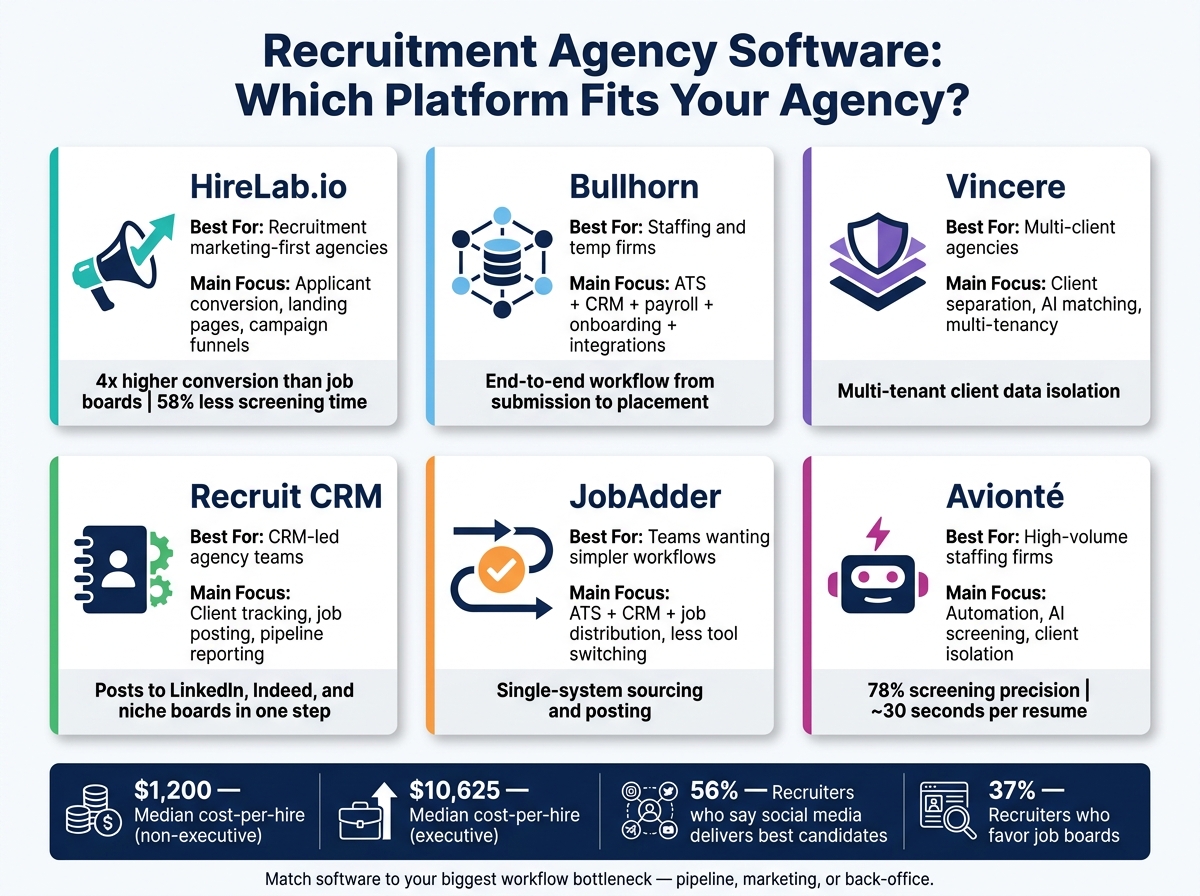
Recruitment Agency Software Comparison: 6 Top Platforms at a Glance
Quick Comparison
| Platform | Best for | Main focus | Watch for |
|---|---|---|---|
| HireLab.io | Recruitment marketing-first agencies | Applicant conversion, landing pages, campaign funnels | Less suited to database-led recruiting by itself |
| Bullhorn | Staffing and temp firms | ATS, CRM, payroll, onboarding, integrations | Check setup scope and add-on costs |
| Vincere | Multi-client agencies | Client separation, sourcing, messaging, AI matching | Map every needed connection before buying |
| Recruit CRM | CRM-led agency teams | Client tracking, contacts, job posting, reporting | Compare ATS depth with other tools |
| JobAdder | Teams that want less tool switching | ATS, CRM, job distribution | Ask which analytics and automations cost extra |
| Avionté | High-volume staffing firms | Automation, AI screening, client isolation | Setup time and tier details matter |
If I were buying, I’d narrow the list with four checks:
- Workflow fit: pipeline, job orders, client records
- Marketing tools: social ads, apply pages, attribution
- Reporting and connections: analytics tiers, ATS/CRM sync
- Price at scale: applicant caps, funnels, support, upgrade cost
That’s the core of this guide: match the software to the part of recruiting that is costing you time, applicants, or placements.
1. HireLab.io
HireLab.io is built for conversion-first recruiting. It turns social and digital traffic into qualified applicants with AI landing pages, application forms, and a no-code campaign builder.
That’s the big shift here: instead of putting the candidate database or pipeline at the center, HireLab.io is built around high-converting job ads that drive applications. So if an agency is comparing recruitment marketing software with a more standard ATS setup, the main question is pretty simple: does this tool turn traffic into applicants fast enough to make the workflow switch worth it? If applicant conversion sits at the top of the buying checklist, this platform makes the most sense.
Its ATS captures funnel submissions in one system.
Users report 58% less screening time, 4x higher conversion than traditional job boards, and time to first contact under 24 hours [3].
Pricing depends on how many funnels and ATS features an agency needs:
- Free: ATS, one active funnel, up to 50 applicants
- Optimize: $109/month, unlimited ATS applicants, custom domains, up to five active funnels
- Advance: $274/month, A/B testing, advanced analytics, recruiter workspaces, and external ATS integration [3]
Use it when campaign-driven applicant capture matters more than a standard ATS-led workflow. Next, compare tools built around broader ATS, CRM, and staffing workflows.
2. Bullhorn
Bullhorn is an ATS and CRM platform built to handle both ATS and CRM workflows in one place. It carries candidate data from submission through placement and onboarding [1]. So when agencies size up Bullhorn, the big thing to look at is integration.
That’s where Bullhorn stands out. Its integration marketplace connects payroll, benefits, background checks, and assessments, which cuts down on manual re-entry [1]. Less re-entry means fewer data gaps, and that gives recruiters a clearer view of reporting across the full workflow.
Its integration-first setup and support for multiple teams make it a fit for agencies that need to grow or run work across several teams [1]. For agencies comparing ATS depth with workflow flexibility, that’s the main tradeoff to look at.
3. Vincere
For agencies that need tighter client separation, Vincere takes a more partitioned approach. It uses multi-tenancy to keep candidate data, interview feedback, and shortlists separated by client. For agencies juggling many clients, that setup is especially useful.
That also makes the rest of the platform’s sourcing and admin tools worth a close look.
From there, check whether its sourcing, messaging, and admin tools fit your team’s day-to-day work, including:
- social channels
- niche communities
- SMS
- AI matching
- calendar sync
- SSO
- payroll integrations
Map every required integration before you buy.
4. Recruit CRM
Recruit CRM brings together client tracking, contact management, and job distribution for agencies that want one place to run both relationships and hiring. It works well for teams that need solid CRM structure without slowing down sourcing.
It can post jobs to LinkedIn, Indeed, and niche boards in one step [1]. That makes day-to-day sourcing simpler, especially when recruiters need to get roles in front of people fast across several channels.
Its reporting covers time-to-hire and core pipeline metrics, and multi-tenancy helps agencies keep client accounts separate as they grow [1]. If you need an ATS with more depth, it helps to look at how the next platforms deal with automation, compliance, and workflow control.
5. JobAdder
JobAdder brings ATS, CRM, and job distribution into one place for agency teams. The main buying factors tend to be job advertising, recruiter output, and support costs. Put simply, its big selling point is less tool switching. Recruiters can stay in one system instead of bouncing between tabs all day.
That makes JobAdder a good fit for agencies that want simpler recruiter workflows and broad job distribution without a heavy setup.
JobAdder lets teams send jobs to boards like Indeed and LinkedIn from a single workflow, so sourcing and posting happen inside the same system instead of across separate tools [1]. If your agency leans hard on social recruiting, it’s smart to check current social-channel support beyond Indeed and LinkedIn [2].
Before you buy, ask a few direct questions:
- Is support included in the base price?
- Which automation features come standard?
- Which analytics are locked behind a higher tier?
If your agency needs deeper compliance controls and staffing automation, compare JobAdder with the next platform.
6. Avionté
For agencies juggling lots of active accounts and high-volume placements, Avionté leans hard into two things: client separation and automation. Its client-isolation model keeps each client’s candidate data separate across multi-account staffing workflows.
Avionté also includes AI screening, automated job posting, and resume reformatting. The platform reports 78% screening precision and roughly 30 seconds per resume [2]. In plain English, that makes it a solid option for teams that need screening and posting to move faster, not just a tool with AI stamped on the label.
Reporting and integrations are part of the package, but it’s smart to check what’s included by default and what costs extra. The same goes for setup. Implementation usually takes 4 to 8 weeks for data migration and training [3]. Those tradeoffs matter most when you’re weighing client separation, automation depth, and rollout time side by side.
Side-by-Side Comparison: Four Key Buying Criteria
1. Workflow Fit
Start with workflow fit. The first thing to check is simple: can the platform handle pipelines, client tracking, and job orders without hacks or patchwork fixes?
| Buyer question | What to verify | Why it matters |
|---|---|---|
| How does the platform capture candidates from campaigns or social channels? | Branded landing pages, smart forms, and a funnel builder that move candidates from click to application | Gaps between traffic sources and the ATS create data loss and slower follow-up |
| What ATS coverage comes standard? | A free ATS captures applicant data at no cost | Knowing what’s included by default prevents surprise gaps at setup |
| What is the primary use case? | Improving front-end conversion and reducing application drop-off | Confirms whether the platform fits campaign-driven or pipeline-driven workflows |
You’ll also want to ask whether campaign data, candidate data, and reporting stay connected from start to finish. That link matters more than it may seem at first glance. If the data breaks apart halfway through, teams end up guessing where applicants came from and what actually worked.
Once that part checks out, move to the next issue: can the platform bring in qualified applicants, not just clicks?
2. Marketing and Automation
56% of recruiters say social media delivers their best candidates, compared with 37% who favor job boards [2]. That gap says a lot. If your agency depends on proactive sourcing, your software has to help with job marketing, not just applicant management.
| Buyer question | What to verify | Why it matters |
|---|---|---|
| Which ad channels does the platform support natively? | Meta and LinkedIn campaign support | Limits here force workarounds and break attribution |
| How are campaigns built and managed? | A campaign builder and AI-powered page builder | Determines how fast teams can launch and iterate on job campaigns |
| What conversion tools are included? | Smart forms, branded landing pages, a built-in ad optimizer, and A/B testing on the Advance plan | Directly affects application volume and source-of-hire accuracy |
Use unique, branded application links for every position to make source-of-hire tracking more accurate [2]. That sounds small, but it can save a lot of confusion later. If every campaign points to the same generic application page, source data gets muddy fast.
Ask a few direct questions here:
- Do branded apply links work across every campaign type?
- Can performance be measured by channel?
- Does the platform show which campaigns turn into completed applications?
That last point is where many tools fall short. They can show traffic, maybe even clicks, but not what happened after that. And for recruiters, that’s the part that counts.
3. Reporting and Integrations
Here, the main question is whether campaign data moves cleanly into your ATS, CRM, and reporting stack.
| Buyer question | What to verify | Why it matters |
|---|---|---|
| What analytics are available and at which tier? | Advanced analytics on the Advance plan | Determines how much reporting depth you get without custom work |
| Which integrations are included by default? | External ATS integration on the Advance plan | Clarifies whether your existing tools connect without add-on costs |
| How is applicant data stored and scaled? | Free ATS on the Free plan; higher tiers expand applicant limits | Affects long-term data continuity as volume grows |
This is where pricing pages can get slippery. A platform may look fine at first, but once you dig in, the reporting you need sits on a higher tier, and the integration you assumed was included turns out to be extra.
So ask what comes with the base plan, what counts as an add-on, and how much reporting depth you get without custom work. Then line that up with the tier that actually includes those items, not the one that only looks good on the surface.
4. Pricing and Scalability
For agencies, the limits that matter most are usually active funnels, applicant caps, integrations, analytics, and support access. The goal is to match those limits to your current hiring volume and what you expect over the next few months.
| Plan | Price | Included highlights |
|---|---|---|
| Free | $0/month | 1 active funnel, free ATS up to 50 applicants, 3 premium page templates, auto form builder, mobile responsiveness, and AI page builder |
| Optimize | $109/month | Up to 5 active funnels, unlimited ATS applicants, complete page templates library, job bundle widget, custom domains, HireLab branding removed, and live support |
| Advance | $274/month | 15 active funnels, external ATS integration, A/B testing, smart tag automation, advanced analytics, recruiter workspaces, and 24/7 live chat support |
If your funnel count or applicant volume is likely to rise, check the caps at each tier before signing off. Also ask what an upgrade costs. That way, you’re not stuck with a plan that fits today but starts to pinch as soon as hiring picks up.
Pros and Cons by Agency Type
The right fit comes down to three things: your hiring volume, how your team works, and where candidates come from. This matrix makes that easier to see by linking each agency type to the workflow gap it needs to fix.
Here’s the short version of the main fit-vs.-trade-off call:
| Agency Type | Best Fit | Trade-offs to Expect |
|---|---|---|
| Boutique perm or recruitment-marketing-first | HireLab.io | Best for branded landing pages, social campaigns, and passive-candidate capture; less useful for heavy database-led sourcing. |
| Temp staffing firm | Bullhorn | Strong back-office depth, payroll, and integrations; weaker at candidate acquisition. |
| Executive search team | A CRM-first ATS/CRM | Strong relationship tracking and passive-candidate reach, but teams often need additional sourcing tools. |
| Multi-location agency | A multi-tenant ATS with granular access controls | Better for data separation and scale, though implementation can take more effort. |
The main split is pretty simple: back-office power vs. front-end conversion.
HireLab.io works well as the front layer for an existing ATS. In plain English, it can add social campaign support and landing page functionality without forcing you to replace the pipeline tools your team already uses. That’s the trade-off worth checking against your non-negotiable workflows.
Conclusion
Choosing recruitment agency software comes down to one honest question: where is your process losing candidates, time, or placements? That’s the place to start.
If the pain is back-office work – payroll, compliance, or VMS integrations – an ATS/CRM or staffing suite usually makes the most sense. If the issue is managing your pipeline and keeping client relationships on track as your desk grows, an ATS/CRM can bring order without the weight of a big enterprise system.
But if the main problem is candidate acquisition, that’s a different story. If candidates aren’t applying, social campaigns aren’t turning into leads, and your job pages all feel the same, then you’re not dealing with an ATS issue first. You’re dealing with a candidate acquisition problem. In that case, a focused recruitment marketing tool like HireLab.io is built to fix that gap by helping agencies create branded landing pages and social campaigns that capture and qualify passive candidates before they enter an existing ATS [3].
Shortlist tools based on the workflow gap first. Then use total cost of ownership, compliance risk, and your growth stage to narrow the field to the final two or three options. That way, you avoid paying for features your team won’t use and stay focused on the tool that helps you make more placements.
FAQs
How do I know which recruiting bottleneck to fix first?
Map your current recruiting process, then check the main numbers in your software’s reports and dashboards. It helps to think of the process as a funnel: each stage shows where people keep moving and where they drop off.
Here’s what that can look like in practice:
- High click-through rates but low application starts usually point to a landing page problem.
- High starts but low completions often mean there’s friction in the form.
- Qualified candidates who never make it to interviews often signal slow routing or slow recruiter response time.
Start by fixing the stage that creates the biggest delay first.
Should I replace my ATS or add a marketing layer first?
Not necessarily. You can add a conversion-focused intake layer between your social traffic and your ATS without replacing the system you already use.
That layer helps you do a few things before people hit the ATS:
- collect candidate data
- screen for must-have qualifications
- keep message match in place from the original ad or post
Then you can sync clean data into the ATS.
Why does that matter? Because many ATS platforms are built for compliance and hiring workflows, not for turning social clicks into completed applications. An intake layer can cut candidate drop-off while still keeping your ATS as the central hub for compliance and hiring workflows.
What hidden costs should I ask about before buying?
Beyond the base monthly subscription, ask about setup, data migration, customization, integrations, technical support, and optional add-ons.
Features like AI-powered candidate ranking or compliance modules can push the total price up. It’s also smart to confirm that your contract includes clean data exports. If you switch vendors later, that one detail can save you from a nasty extra bill.



Recruitment Marketing Software Explained
September 22, 2026[…] screening is what helps agencies grow output without piling on manual work. Choosing the right recruitment agency software to sit alongside these campaigns keeps client reporting and candidate data from fragmenting across […]