

Talent Solutions: What They Include and How to Choose
Most hiring teams do not need more tools. They need talent solutions that fix the right bottleneck. If cost per hire is about $4,700 on average in the U.S., and some executive hires can pass $14,000, picking the wrong setup gets expensive fast.
Here’s the short version: I’d separate talent solutions into 7 buckets, then choose based on where hiring breaks first.
- Recruitment marketing platforms: help more people find your jobs before they apply
- Sourcing and talent intelligence tools: help recruiters find hard-to-reach candidates
- CRM platforms: help teams keep candidate relationships warm over time
- AI screening and assessment tools: help sort applicants and test skills after apply
- Talent analytics platforms: show where time, money, and candidate quality are slipping
- Recruitment agencies and RPO providers: add outside help when team bandwidth is the issue
- Integrated talent solutions: combine tools, service, process, and reporting in one setup
A simple rule for choosing talent solutions works well:
- If people don’t see your jobs, fix reach
- If people see them but don’t apply, fix conversion
- If you get applicants but can’t review them fast enough, fix screening
- If your team is overloaded, add outside recruiting support
- If the whole process is scattered, look at a combined model
A few numbers make the stakes clear:
- 73% of the global workforce is passive talent
- 46% of sourced hires in 2026 came from candidates already in a company’s CRM or ATS
- 46% of U.S. candidates abandoned applications when asked to retype resume data
- 73% abandoned applications that took more than 15 minutes
- Each extra week in the hiring process can add 10%–15% to cost per hire
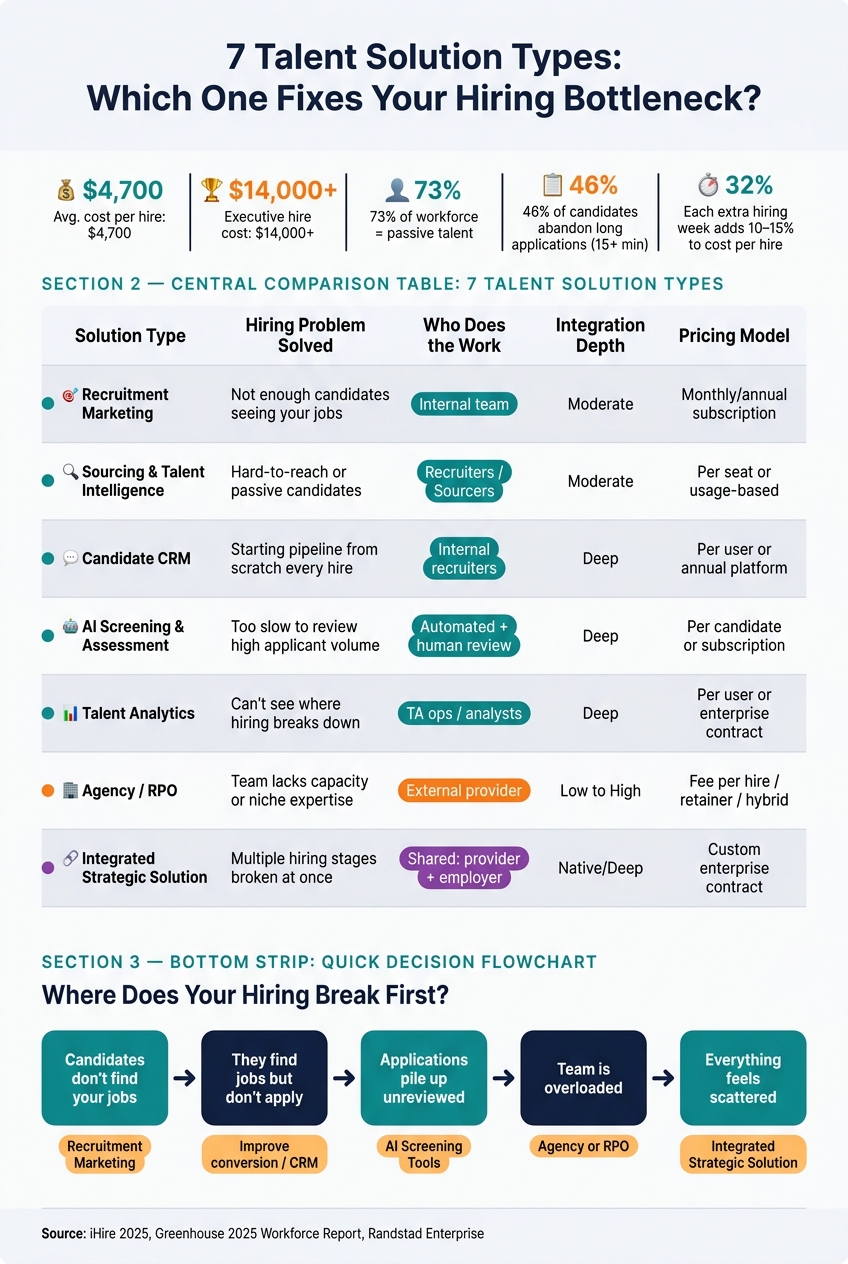
7 Talent Solution Types: Which One Fixes Your Hiring Bottleneck?
10 talent acquisition tools that’ll save you HOURS of work!
Quick Comparison of Talent Solutions
| Solution Type | Main Job | Best When | Who Does the Work | Common Pricing |
|---|---|---|---|---|
| Recruitment Marketing | Drive awareness and apply starts | You need more reach and stronger top-of-funnel traffic | Internal team | Monthly or annual software fee |
| Sourcing & Talent Intelligence | Find people who may not apply on their own | Roles are hard to fill or applicant flow is thin | Recruiters or sourcers | Per seat, usage-based, or custom |
| CRM | Re-engage known candidates | You hire for the same roles again and again | Recruiters and recruiting ops | Annual platform fee or per-user fee |
| AI Screening & Assessment | Sort applicants and test fit | Apply volume is high and review time is slow | Tool plus human review | Per candidate, per test, or subscription |
| Talent Analytics | Track funnel health and cost | You need better reporting and cleaner decisions | TA ops, leaders, or analysts | Per user, per month, or enterprise contract |
| Agency / RPO | Add outside recruiting help | Team bandwidth or search reach is the problem | External provider | Fee per hire, retainer, monthly fee, or hybrid |
| Integrated Talent Solution | Run hiring in one managed setup | Several parts of hiring are broken at once | Shared between employer and provider | Custom contract |
Bottom line: when comparing talent solutions, I’d choose the option that fixes the single biggest measurable problem first, then test it with a pilot before rolling it out more broadly.
1. Recruitment Marketing Platforms
Recruitment marketing platforms help companies get in front of candidates before they apply. Think of them as the top-of-funnel layer among talent solutions.
They usually bring together career pages, recruitment landing pages, email and SMS outreach, talent community features, employer brand content, and analytics in one place. They don’t replace an ATS. They work alongside it by filling the pipeline before someone enters the formal hiring process.
Hiring Problem Solved
These platforms solve a reach problem. They help employers connect with passive candidates before those people ever visit a job board or start an application.
That matters because about 73% of the global workforce is made up of passive candidates who aren’t actively job hunting on job boards.[1] A standard job post won’t reach a big chunk of that audience. Recruitment marketing platforms close that gap with targeted ads, mobile-friendly landing pages, and automated nurture sequences that keep people engaged over time and move them toward applying.
They also pull campaign management and reporting into one system. That makes them a strong fit for:
- High-volume hiring
- Employer brand campaigns
- Pipelines that depend on passive talent
When reach is the main issue, these platforms can do a lot of the heavy lifting. When the issue is finding the right people one by one, sourcing tools are the next step.
Who Owns It
These platforms are usually owned by talent acquisition or recruitment marketing teams. Other groups often support the work too, including employer branding, marketing, IT, legal, privacy, and hiring managers.
In most cases, talent acquisition owns the big decisions: strategy, audience targeting, messaging, approvals, budget, and performance review.
That setup matters. These tools tend to work best when marketing, TA, and legal stay in sync instead of working in separate lanes.
Integration Depth
At a bare minimum, the platform should send candidate and source data into your ATS with attribution still attached. If that breaks, however, reporting gets messy fast.
More advanced setups may include:
- Real-time job sync
- CRM-to-ATS movement
- API or webhook connections
- Analytics exports that tie campaign activity to interviews and hires
It also helps to confirm how the integration is built. Is it native, partner-built, or handled through middleware? And which data fields actually sync? Those details can sound small, but they matter a lot if your hiring process depends on clean handoffs and source tracking.
Cost Model
Pricing can range from annual subscriptions to enterprise packages that run above $140,000 per year.[4] In addition, ad spend is usually billed separately.
When you’re pricing talent solutions like these, don’t stop at the software fee. Total cost should also include implementation, creative work, integrations, and training.
For tougher roles, the next layer of talent solutions is usually tools built to identify specific candidates, not just attract them.
2. Candidate Sourcing and Talent Intelligence Tools
Recruitment marketing helps you reach more people. Sourcing and talent intelligence tools do the opposite: they help you narrow the field and find the right people faster.
These tools let recruiters actively find, sort, and contact candidates before they apply – or while they’re still early in the process. That can include searches across professional networks, public web profiles, resume databases, internal talent pools, and niche communities using filters like skills, experience, location, and more. Some products blend sourcing with talent intelligence, so it helps to separate database-only tools from broader platforms. They help fill the pipeline, but they don’t run the full hiring process.
In addition, talent intelligence goes a step beyond candidate search. It looks at the labor market at a broader level: where talent is clustered, which skills are common in a given area, which competitors are hiring, and how pay trends are moving. That makes these tools useful not just for open roles today, but also for longer-term workforce planning.
Once you’ve found the right people, CRM platforms help keep them warm until they’re ready to make a move.
Hiring Problem Solved
The main issue these tools solve is limited access to qualified talent – especially for hard-to-fill roles where applicant volume is thin. Teams doing high-volume hiring can also use them to build repeatable pipelines instead of starting from scratch each time.
A big upside is that they help recruiters search beyond job titles. Instead of looking only for “security engineer,” a recruiter can widen the search to nearby skills like threat detection, incident response, SIEM, or cloud security. That can surface candidates who might otherwise stay hidden.[5]
Still, better discovery doesn’t mean automatic fit. Recruiters still need to check experience, work authorization, pay expectations, and location or remote-work fit before treating any profile as a qualified prospect.
Operational Ownership
In most cases, sourcers and recruiters own these tools day to day. Sourcers set search criteria and build prospect lists. Recruiters handle outreach and move candidates into the ATS. Meanwhile, recruiting operations or HRIS teams often manage permissions, integrations, data quality, and reporting. Hiring managers also support the process by confirming the target profile and giving feedback on shortlist quality.
Some vendors mix AI with human review and send curated candidate batches instead of raw search results. That shifts part of the operational load to the vendor, which can be a good fit for lean teams.
Start small:
- Two or three roles
- One intake profile
- One outreach template
That gives teams a simple way to test fit before rolling the tool out more broadly.
Integration Depth
At a bare minimum, a sourcing tool should export or sync candidate profiles, notes, source attribution, and outreach history into your ATS or CRM. Better setups also support two-way sync, automated activity logging, duplicate detection, and status updates that stay tied to the candidate record.
Before signing a contract, test the basics in plain terms. Check field mapping. Look at how duplicates are handled. Confirm whether status changes sync back into your ATS or if the tool only pushes flat files. In fact, those details can save a lot of cleanup later.
Cost Model
Pricing usually ranges from per-seat subscriptions to enterprise deals. Total cost often goes beyond the license itself and can include:
- Data credits
- Outreach volume
- Integrations
- Implementation
- Training
If sourcing is only the opening move, CRM systems handle the longer-term nurture work.
3. Candidate Relationship Management (CRM) Platforms
Among talent solutions, a recruiting CRM helps you keep sourced candidates warm between openings. Instead of rebuilding your pipeline from zero every time a new role opens, you stay in touch with people you already know: passive prospects, past applicants, referrals, alumni, contractors, and silver medalists who were close but didn’t get the last offer.
The big idea is pretty simple. In other words, your talent database shouldn’t sit there like a dusty spreadsheet. It should work like an active pipeline you can return to again and again. A CRM handles relationships before someone applies. An ATS takes over after they apply. That’s why a CRM sits right between sourcing and the ATS.
Hiring Problem Solved
The main issue a CRM solves is starting from scratch every single time a role opens up. In fact, that problem is bigger than many teams think.
One reported benchmark found that 46% of sourced hires in 2026 came from candidates already in a company’s existing CRM or ATS database [2]. That’s a big signal. If your team keeps a healthy talent pool, you may already have strong candidates in your system before the search even starts.
CRMs tend to matter most when roles are tough to fill, hiring happens over and over, or your team depends a lot on passive talent.
Operational Ownership
A CRM doesn’t run itself. Someone has to own it.
In most teams, recruiters and sourcers handle talent-pool building, outreach, and relationship notes on a day-to-day basis. Meanwhile, recruiting operations usually manages setup, data rules, integrations, and reporting. That split works well as long as it’s clear.
Without ownership, candidates go cold fast. Follow-up slips. Notes get missed. Good people who once showed interest drift away.
Integration Depth
At the bare minimum, your CRM should sync with your ATS. Candidate profiles, interaction history, consent settings, and source attribution should move cleanly when someone enters an active requisition.
Other useful connections often include:
- Sourcing platforms
- Career sites
- Email and SMS tools
- HRIS platforms
Before you sign a contract, test the integration in detail. Look at duplicate detection, opt-out sync, and status updates in both directions. A one-way export might sound fine on paper, but it can create duplicate records and reporting gaps that become a mess to fix later.
Cost Model
Enterprise CRM pricing often starts at about $10,000 and can go past $35,000 per year. For smaller teams or staffing-focused groups, however, per-user plans usually land around $99 to $149 per user per month, billed annually.
Don’t stop at the subscription price. Work out the full cost of ownership, including implementation, data migration, messaging volume, and integration work. That’s where the actual spend often shows up.
When the job changes from nurturing candidates to deciding who should move forward, AI screening tools step in.
4. AI Screening and Assessment Tools
Once candidates apply, these tools help sort the stack before a recruiter steps in. AI screening tools compare applicants against job requirements. Assessment tools, on the other hand, check skills through tests, work samples, or structured interviews.
The best setups use job-related criteria: coding tests, writing samples, or customer-service simulations. That’s the point. When applications start piling up, the main test is simple: how much time do they save without hurting hiring quality?
Hiring Problem Solved
In high-volume hiring, manual review gets slow fast. It also gets uneven. Screening tools therefore help teams spot who clears the baseline and move those people forward, without asking a recruiter to read every resume one by one.
Use has grown fast. According to iHire‘s 2025 State of Online Recruiting survey, 25.9% of employers used AI in recruitment in 2025, up from 14.7% in 2024 and 4.9% in 2023. Among those using AI, 32.1% said they used it to screen applicants and resumes, up from 11.6% the year before.[10] That’s a steep climb in a short stretch.
Overall, you see the clearest payoff in high-volume, repeat hiring: frontline retail, customer service, logistics, and healthcare. For example, in one healthcare case, a team screened 1,800 nurses in two weeks and cut screening time from 20 minutes to 8 minutes per candidate.[11]
Still, AI should support human judgment, not take it over. The EEOC has stated that employment laws apply to AI-based selection tools the same way they apply to traditional procedures.[7] Employers are still on the hook for hiring decisions, even if a vendor supplies the tool.
That matters because a black-box score can create legal and hiring risk. So can weak stand-ins like a candidate’s name, ZIP code, or writing style. If a tool screens out good people for the wrong reasons, the damage goes beyond compliance. It hurts hiring quality too.
Operational Ownership
Ownership is shared. TA sets the screening criteria. Hiring managers then check that those criteria match the job. Finally, HR, legal, privacy, security, accessibility, and IT handle compliance, data, and access.
When ownership is fuzzy, problems show up fast. Screening quality slips. Compliance gaps open. Candidate experience gets worse.
Before launch, test whether the tool creates uneven pass rates across demographic groups. After launch, keep watching pass rates, completion rates, and rejection patterns over time. If those numbers drift, you need to know early. The next practical question is whether the results feed back into your ATS cleanly.
Integration Depth
Integration can be light, moderate, or deep.
- A basic setup may just send an assessment link by hand after an application comes in.
- A moderate setup connects to your ATS, writes scores back to candidate profiles on its own, and triggers next steps based on requisition rules.
- A deep setup syncs job requisitions, candidate data, interview feedback, audit logs, and analytics across your ATS, HRIS, CRM, and reporting stack.
Look closely at API and webhook support, duplicate handling, audit trails, model-version records, and data retention after the contract ends. A tool may look cheap at first, but if your team has to move data by hand, that price edge can disappear fast.
Cost Model
After integration, pricing becomes the last big filter. Costs vary a lot, and many vendors don’t post them in public. Common pricing models include per-seat, per-requisition, per-completed-assessment, and annual platform subscriptions.
Published examples run from a recruiting platform that starts at about $49 per month with credits for resume screening, assessments, and one-way interviews, up to enterprise video-assessment products that cost tens of thousands of dollars per year.[6][8]
As with other talent solutions, the full cost goes beyond the sticker price. You also need to count implementation, integration, compliance review, accessibility testing, candidate support, and renewals. Therefore, the best way to judge ROI is to track recruiter hours saved, qualified-candidate yield, interview conversion, and cost per hire.
5. Talent Analytics Platforms
Talent analytics platforms pull data from your ATS, CRM, sourcing, assessment, and HR systems, then turn that data into dashboards, benchmarks, alerts, and predictive insights.
That matters for a simple reason: the other talent solutions in your stack create data, but analytics tells you whether those tools are helping hiring get better.
Hiring Problem Solved
Talent analytics helps teams get past scattered reports and gut-feel decisions. It can show where candidates drop out, which sources lead to qualified hires instead of just more applicants, where the process gets stuck, and whether hiring goals match reality.
The metrics that matter most usually fall into four buckets: speed, quality, cost, and source. Common examples include time to hire, time to fill, time in stage, source-of-hire effectiveness, conversion by stage, offer-acceptance rate, candidate experience, cost per hire, recruiting spend, quality of hire, and first-year retention.[12][13]
A simple reporting rhythm helps here:
- Review operational metrics weekly
- Review recruiting outcomes monthly
- Review post-hire outcomes quarterly
That cadence keeps the team from chasing speed alone and hurting quality or retention in the process.
Each extra week in the hiring process can increase cost per hire by 10%–15%.[1][3] Analytics platforms make that drag visible before it piles up.
Operational Ownership
Talent acquisition operations, recruiting leadership, or people analytics usually owns the platform. That team sets metric definitions, manages permissions, keeps data clean, and publishes recurring reports.
From there, different teams use the data in different ways. For example, recruiters use it to adjust sourcing and workflows. Similarly, hiring managers use it to check pipeline health and expected fill dates. Finally, finance and business leaders use it to review hiring costs, team capacity, and workforce plans.
One common failure point is inconsistent metric definitions. If two teams calculate time to hire in different ways, the dashboard turns into noise. Before launch, document what each metric means and who needs to act on it.
Integration Depth
The right level of integration depends on the decisions you want to make. For example, a basic dashboard may only need ATS data. However, more advanced analysis usually needs links to the HRIS or payroll system for start dates and employment status, assessment tools for scores, performance-management systems for post-hire outcomes, sourcing or recruitment-marketing tools for channel attribution, and survey platforms for candidate or hiring-manager feedback.[15]
| Platform Approach | Typical Data Scope | Best Fit | Main Limitation |
|---|---|---|---|
| ATS-native analytics | Requisitions, candidates, stages, interviews, offers, and hires within one ATS | Teams wanting fast deployment and standard funnel reporting | Does not include broader HR, labor-market, or post-hire data |
| Cross-system recruiting analytics | ATS, CRM, sourcing, campaign, interview, and scheduling data across multiple systems | Mid-market and enterprise TA teams with multiple recruiting tools | Requires integration work and consistent identifiers |
| Workforce planning analytics | Recruiting, HRIS, employee, skills, compensation, and workforce-planning data | Organizations connecting hiring to workforce strategy | Higher implementation complexity and usually custom pricing |
| Labor-market intelligence | External talent pools, skills, locations, compensation, and market availability | Teams assessing where and how to hire | Does not measure the organization’s actual funnel or hiring outcomes |
Before signing a contract, confirm a few nuts-and-bolts details: whether integrations are native, API-based, or file-based; how often data refreshes; and how the platform handles duplicate records, missing values, permissions, and personally identifiable information.[15]
Cost Model
Pricing varies a lot. Models may be per user, per recruiter seat, per employee, per active worker, an org-wide flat fee, or a custom enterprise quote.
Budget tools are often around $40–$200 per month, mid-range platforms roughly $1,000–$5,000 per month, and enterprise solutions $5,000 or more per month.[17] Reported examples include platform subscriptions around $400 per month and $15 per user per month, while some enterprise people-analytics deployments start near $25,000 per year, with per-employee pricing often in the $100–$250 annual range.[16][14]
The subscription fee is only part of the picture. Total cost of ownership also includes implementation, data migration, integration work, premium support, extra seats, custom reporting, security review, and day-to-day administration. In other words, cheap software stops looking cheap when someone has to patch together manual exports and weekly reconciliation just to keep reports usable.
When analytics shows the issue isn’t data but team capacity, agencies and RPO providers are often the next step.
6. Recruitment Agencies and RPO Providers
When your data shows the main bottleneck is recruiting capacity, agencies and RPO providers are usually the next move. However, these two talent solutions solve different problems.
Recruitment agencies are built for targeted searches. RPO adds more hiring capacity and tighter process control. So the rule of thumb is pretty simple: use agencies for hard-to-fill, lower-volume roles, and use RPO when you need repeat hiring at scale and a steadier process.
Hiring Problem Solved
Agencies are strong when you need access to niche, confidential, or hard-to-reach candidates. Instead of waiting for applicants, they lean on existing networks and direct outreach to find people your team may not be able to reach on its own. That makes them a good fit for focused, time-sensitive needs, like a tough technical hire, a confidential executive search, or a small set of specialist roles.
RPO providers solve a different issue: scale and process consistency. For example, if you have a defined hiring push, project-based RPO can add temporary capacity. If the hiring pressure keeps coming back, full RPO can place recruiters into your process, standardize screening, handle interview coordination, and track results against agreed targets. For instance, in one Randstad Enterprise engagement with Pratt & Whitney, the provider cut time to hire from 45 to 31 working days and raised offer acceptance to 85%.[23]
Operational Ownership
The main difference comes down to scope. Agencies search. RPO can run part or all of the workflow.
Agencies usually handle sourcing and screening. RPO can take on intake, scheduling, offers, and reporting, while final hiring authority still stays with you.[3][22]
Before you sign with either one, get very clear about where the provider’s work stops and your team’s work starts. A RACI chart for each funnel stage can help define handoffs and stop candidates from falling through the cracks.
Integration Depth
Agency integration is often light to moderate. The agency gets a job brief, uses its own networks and sourcing channels, and sends candidates into your ATS or vendor portal.
RPO goes deeper. The provider may work directly inside your ATS, CRM, scheduling tools, HRIS, and analytics systems, often under your employer brand.[22][25] Before an RPO launch, check system access controls, data security rules, and who keeps ownership of candidate records and recruiting content if the engagement ends.
Cost Model
Once the work split is clear, pricing becomes the next big point to compare.
Agencies most often charge in one of these ways:
- Contingency: you pay a percentage of first-year compensation only after a hire is made
- Retained search: staged payments for an exclusive, research-heavy search
Typical U.S. agency fees are about 15% to 25% of first-year compensation for contingency recruiting and about 25% to 35% for retained search, though rates change by role, industry, and contract terms.[18][19][20]
RPO pricing often shows up as cost per hire, monthly management fees, cost per resource, transaction-based charges, project fees, or a hybrid model.[21][24][26] The best way to judge those fees is to compare them with your fully loaded internal cost per hire, including recruiter time, sourcing tools, job ads, and vacancy cost.
7. Integrated Strategic Talent Solutions
When point tools or agency help fix a capacity gap, but hiring still feels scattered, integrated strategic talent solutions are often the next move. Maybe workflows vary by team, tools don’t talk to each other, and the data is thin. That’s where this model comes in.
It brings recruiting technology, employer branding, sourcing, screening, analytics, and recruiting support into one managed program. Unlike the earlier talent solutions, this option combines software, service, and process ownership in a single setup. It also treats hiring as an always-on function, not a string of separate requisitions. And unlike a point tool, this is a full operating model, not just one product.
Hiring Problem Solved
Integrated talent solutions are built for organizations where recruiting itself is broken, not simply short on bandwidth. The usual signs are pretty clear: inconsistent workflows across locations, high agency spend without central oversight, weak visibility into what’s driving hires, limited in-house recruiting capacity, hard-to-fill roles, or fast growth across several U.S. markets.
As a result, these programs cut time to fill and lower cost by centralizing workflow, reporting, and execution. That makes them a fit when the recruiting system needs a rebuild, not just more hands.
Operational Ownership
The key feature here is accountability for recruiting results, not just candidate flow. This operating model combines tools, service, and governance so both sides have clear responsibility, while the employer still controls hiring decisions, compensation, and culture.
Before launch, spell out who owns intake, approvals, candidate communication, scheduling, offers, data, and compliance. Strong programs also set measurable SLAs, such as response time, qualified-candidate rate, offer acceptance, and hiring-manager satisfaction, instead of judging success by résumé volume alone.
The tradeoff is simple: less in-house control in exchange for more consistency, visibility, and speed.
Integration Depth
Integration can be light or deeply embedded. For example, a basic model might connect to your ATS and calendar tools. In contrast, a fuller setup can span ATS, CRM, HRIS, assessments, onboarding, and analytics, all under your employer brand and policies.
Before signing, confirm a few things:
- Whether the provider works inside your current systems or brings its own tech stack
- How candidate records sync across systems
- Who keeps data ownership if the engagement ends
It also helps to separate technology, labor, and process ownership. Those sound similar, but they are not the same service.
Cost Model
Compare management fees, cost-per-hire pricing, and hybrid models against your current total recruiting cost. That means looking at internal labor, ads, assessments, agency spend, and vacancy cost.[27]
This distinction sets up the side-by-side comparison of talent solutions below.
How the Main Talent Solutions Compare
The main types of talent solutions differ in four key ways: the hiring problem they solve, who handles the work, how tightly they connect to your systems, and how you pay for them.
| Solution Type | Hiring Problem Solved | Who Runs It | Integration Depth | Pricing Structure |
|---|---|---|---|---|
| Recruitment Marketing | Attracting qualified applicants and improving campaign conversion | Internal team operates the platform | Moderate – ATS sync via API or webhooks | Monthly or annual subscription, often tiered |
| Candidate Sourcing & Talent Intelligence | Finding passive or hard-to-reach candidates | Internal recruiters or sourcers | Moderate – connects to ATS and outreach tools | Per seat, usage-based, or custom enterprise pricing |
| Candidate CRM | Building and maintaining candidate pipelines over time | Internal recruiters | Deep – syncs with ATS candidate records | Subscription based on users, contacts, or volume |
| AI Screening & Assessment | Reducing manual review while applying consistent screening criteria | Automated, with human review | Deep – plugs into ATS or application forms | Per candidate, per assessment, or subscription |
| Talent Analytics | Identifying bottlenecks and measuring recruiting performance | Internal analysts or TA leaders | Deep – pulls from ATS, HRIS, and ad platforms | Per user, per data source, or enterprise contract |
| Recruitment Agency | Adding recruiting capacity, expertise, or market access | External agency owns execution | Low – often manual or portal-based handoffs | Contingency or retained fee |
| RPO Provider | Adding recruiting capacity at scale | External team embedded in your process | High – deeply connected to ATS and HRIS | Monthly management fee, cost per hire, or hybrid |
| Integrated Strategic Talent Solution | Coordinating technology, people, process, and workforce strategy | Blended – provider runs operations, employer keeps hiring decisions | Native or deep across ATS, HRIS, CRM, and analytics | Custom enterprise contract |
The biggest difference between talent solutions comes down to who’s doing the work: your team or an outside provider.
Software-led tools keep execution in-house. Your team uses the platform, runs the campaigns, reviews candidates, and manages the process day to day. Agencies and RPO providers work differently. Instead, they shift execution to the provider, which can help if your team is stretched thin or needs outside support.
There’s also an important difference between agencies and RPO. Agencies add targeted search capacity, which makes sense when you need help filling specific roles or reaching talent your team can’t easily access. RPO adds embedded recruiting capacity and process control, so the provider becomes part of your hiring operation at a much deeper level.
Within the recruitment marketing category of talent solutions, HireLab.io is a software-led example focused on attraction and early-funnel conversion. Its published pricing is €0, €99 per month, and €249 per month. Since those prices are listed in euros, not U.S. dollars, it’s smart to verify current terms directly with HireLab.io.
Next, weigh the pros and cons of each of these talent solutions.
Pros and Cons of Different Talent Solutions
Use this table to compare options based on who owns the work, what hiring problem you’re trying to solve, and how much team lift you can handle. The simplest way to sort through these talent solutions is to look at three things: who runs the work day to day, how deeply the solution needs to connect with your stack and process, and how much control stays with your team.
| Solution Type | Main Advantages | Main Limitations | Best-Fit Hiring Context |
|---|---|---|---|
| Recruitment Marketing Platform | Improves employer-brand reach, campaign consistency, and applicant conversion | Requires ongoing content production and campaign management; inaccessible career-site or application content and weak attribution are the biggest risks | Volume hiring or competitive talent markets |
| Sourcing & Talent Intelligence Tool | Expands reach to passive candidates; supports niche or hard-to-fill searches | Data may be incomplete, outdated, or duplicated; outreach still requires recruiter effort; unclear opt-out handling is the key risk | Technical, executive, healthcare, or geographically constrained roles |
| Candidate CRM Platform | Enables talent pools, automated nurturing, and rediscovery of prior applicants | Benefits accumulate slowly; requires clean data and recruiter adoption; overmessaging candidates is the key risk | Recurring hiring, seasonal needs, or strong internal mobility goals |
| AI Screening & Assessment Tool | Reduces manual review time; applies consistent, job-related criteria at scale | Can reproduce bias, disadvantage applicants with disabilities, or produce opaque recommendations; disparate impact and lack of human oversight are the biggest risks | High-volume screening where structured criteria are well-defined |
| Talent Analytics Platform | Identifies bottlenecks, measures source quality, and supports budget decisions | Only as reliable as underlying data; metric definition drift | TA teams that need to justify spend or improve process visibility |
| Recruitment Agency | Adds targeted search expertise and candidate access without building internal capability | Placement fees, less process control, and possible misalignment with culture or candidate experience; provider may prioritize searches based on commercial incentives | Episodic, executive, confidential, or highly specialized searches |
| RPO Provider | Adds scalable recruiter bandwidth, process structure, and compliance support | Increases external dependence; requires clear governance; RPO fails when cost cutting outruns governance | High or variable hiring volume that exceeds internal team capacity |
| Integrated Strategic Solution | Connects technology, process, employer branding, and recruiting delivery for consistency at scale | Requires the most planning, implementation time, and executive alignment; more systems mean more vendors, data, and oversight | Enterprise-level hiring with multiple disconnected tools limiting scale or reporting |
The biggest risk areas tend to show up in AI screening and outsourced data control. For example, AI selection tools can create legal exposure under Title VII and the ADA. They also need meaningful human review, which means you can’t hand the whole thing off to a vendor and walk away. [9][28][30]
Similarly, outsourced models, including agencies, RPO, and integrated solutions, need clear contract terms around record ownership, export rights, and what happens to active candidates when the engagement ends. [29] That’s the part many teams skip until there’s a problem.
At the end of the day, choosing between talent solutions depends on how much execution you want to keep in-house. Above all, keep hiring standards, final decisions, compliance, and recruiting data under your control.
Conclusion
The best talent solutions aren’t the ones with the longest feature list. Instead, they’re the ones that remove the biggest hiring bottleneck.
If qualified candidates aren’t finding your roles, you have an awareness problem. If they find your jobs but don’t apply, you have a conversion problem. If applications stack up but screening moves slowly, you have a capacity problem. Different bottlenecks need different fixes. The next step is to pinpoint where your hiring process starts to break.
Before comparing recruiting solution vendors, map your hiring workflow from job discovery to hire. Then look at conversion rates, time in each stage, and recruiter effort across the process. A 2026 summary citing Greenhouse’s 2025 Workforce & Hiring Report found that 46% of U.S. candidates abandoned applications when they had to retype resume data, and 73% abandoned when applications took more than 15 minutes.[31]
Once you’ve found the bottleneck, make sure the tech can support the workflow you need. Check ATS, HRIS, calendar, job board, and reporting integrations in a live workflow before launch. If a platform creates duplicate records or forces manual exports, that’s a red flag. Walk away.
Then compare the full cost of talent solutions, not just the sticker price. Calculate total cost of ownership for the first year, including software licenses, implementation, integrations, training, support, service retainers, and usage-based fees. And don’t stop at cost per hire. Track cost per qualified candidate too. For example, a smaller campaign that brings in fewer but stronger applicants can beat a bigger one every time.
Of all the talent solutions you review, choose the one that fixes the biggest measurable bottleneck, then scale only after results improve. Use software when your team needs better automation or visibility. Instead, bring in agency or RPO support when the gap is expertise or team bandwidth. Finally, consider an integrated strategic solution only when several stages in your hiring workflow are broken and tied together. Match the solution to the bottleneck, test it with a pilot, and measure results against the baseline you set at the start.
FAQs
How do I find my biggest hiring bottleneck?
Before choosing talent solutions, map your recruitment process to see where work gets stuck. If delays show up before people apply, you likely have an attraction problem. If they happen after someone applies, you’re dealing with a processing bottleneck.
Look at time-to-hire, cost-per-hire, and pipeline conversion rates to find the manual, repetitive work slowing things down. Common examples include resume parsing, interview scheduling, and initial screening. These numbers also help you spot where candidates drop out of the process.
When should I choose software over outside recruiting support?
Choose software-based talent solutions when hiring follows a set process, repeats often, or happens at high volume. It’s a good fit for automating routine work like screening, scheduling, and data management. That cuts admin time and helps keep the process consistent.
On the other hand, bring in outside recruiting support when hiring calls for human judgment, close knowledge of your company, or harder decisions. It also makes sense when hiring spikes, compliance risk grows, or admin work starts pulling your team away from more important, people-focused work.
What should I test first in a hiring pilot?
First, map your current recruitment process. The goal is simple: find the manual, repetitive, high-volume tasks that slow everything down.
Next, put your pilot on work that eats up recruiter time but doesn’t call for much judgment. Good examples include:
- Initial candidate screening
- Resume parsing
- Interview scheduling
This is usually where teams feel the biggest drag. If recruiters are stuck doing the same admin work over and over, that’s where a pilot can make an immediate difference.
Also, bring recruiters into the process early and ask for usability feedback. If the tool is clunky, people won’t use it no matter how much time it could save.
For automation or AI tools, begin with high-volume roles first. That gives you more data, more repetition, and a clearer read on what is or isn’t working. Then track results with cost-per-hire and time-to-hire.