



What Is an Applicant Tracking System? A Complete Guide
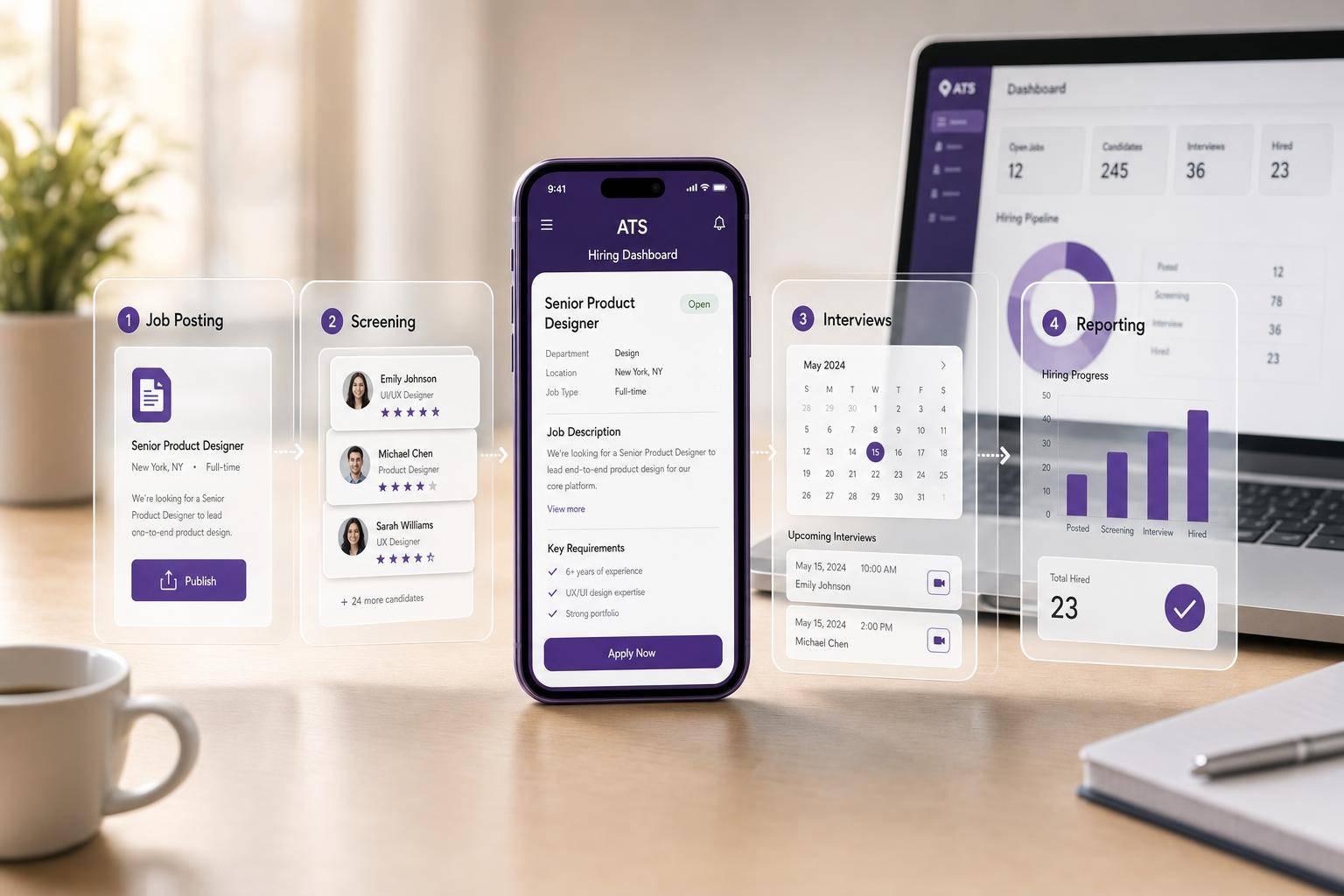
An applicant tracking system (ATS) is the software many employers use to run hiring in one place. It helps teams post jobs, collect applications, sort candidates, schedule interviews, track decisions, and send updates.
Here’s the short version:
- An applicant tracking system keeps hiring organized by storing jobs, resumes, feedback, and messages in one system.
- It saves time by automating repeat tasks like job posting, screening questions, status emails, and interview scheduling.
- It helps teams track results like time-to-fill, source of hire, and where candidates drop out.
- It has limits because keyword filters, bad setup, and long mobile forms can screen out good people or cause applicants to quit.
- It works best with strong top-of-funnel tools since the ATS only helps after someone starts or finishes an application.
A few numbers show why this matters. Recruiters are handling 93% more applications with teams that are 14% smaller than in 2021. Also, 78% of job seekers use smartphones to look for jobs, and poor mobile forms can drive a 20% abandonment rate.
If I were explaining it in plain English, I’d say this: an applicant tracking system is the system that helps you move candidates from application to hire without losing track of people, feedback, or next steps.
| Area | What the ATS does |
|---|---|
| Job setup | Opens roles, supports approvals, posts jobs |
| Application flow | Collects forms, resumes, and candidate details |
| Screening | Uses knockout questions, parsing, and ranking tools |
| Hiring stages | Tracks movement from applied to hired |
| Team workflow | Stores notes, scorecards, and feedback |
| Reporting | Shows funnel drop-off, source data, and hiring speed |
Just as important, an ATS is not the same as a recruitment marketing tool. Marketing tools help bring people in before they apply. The ATS takes over after they enter the hiring process.
So if you want the simple answer, here it is: an applicant tracking system helps hiring teams stay organized, move faster, and measure the process, but it still needs a low-friction application flow and careful setup to work well.
Applicant Tracking System (ATS) Explained: How Modern Recruitment Technology Works
What an Applicant Tracking System Is
Building on that overview, an applicant tracking system puts requisitions, job posts, applications, candidate records, stage decisions, and hiring messages into one system. For hiring teams, that means one source of truth instead of scattered spreadsheets, inboxes, and notes.
What an ATS Manages in One Place
An applicant tracking system tracks job postings, applications, candidate records, interviewer feedback, email threads, and status updates. Recruiters and hiring managers work from the same candidate record, which helps the team stay aligned on decisions.
It also handles routine communication automatically. For example, moving a candidate to “Interview” can trigger alerts for internal stakeholders and send prep emails to the candidate. That keeps communication more consistent and can help cut down on drop-off [1].
ATS vs. Recruitment Marketing Tools
An applicant tracking system manages applicants after they apply. Recruitment marketing tools help bring people in before they apply. This distinction is also what separates an ATS from a recruitment CRM, which focuses on nurturing candidates long before they apply.
That distinction matters because attracting candidates is hard at scale. 73% of the global workforce consists of passive candidates who aren’t actively browsing job boards [2]. To reach them, teams often use branded career pages, social campaigns, and targeted outreach. These tools can tie applicants back to specific campaigns through unique links [2].
| Dimension | Recruitment Marketing Tools | Applicant Tracking System |
|---|---|---|
| Primary Goal | Attract and engage candidates | Manage and track applicants |
| Who It Targets | Active and passive candidates | Applicants and hiring teams |
| Key Features | Landing pages, social ads, automated outreach | Automated screening, stage management, interview scheduling |
| Data Focus | Conversion rates, reach, engagement | Time-to-hire, cost-per-hire, candidate status |
Recruitment marketing fills the top of the funnel. The ATS takes over once candidates enter it.
Next, we’ll look at how that workflow runs from requisition to hire.
How an ATS Works in the Hiring Process
How an ATS Works: From Job Requisition to Hire
From Job Requisition to Application Capture
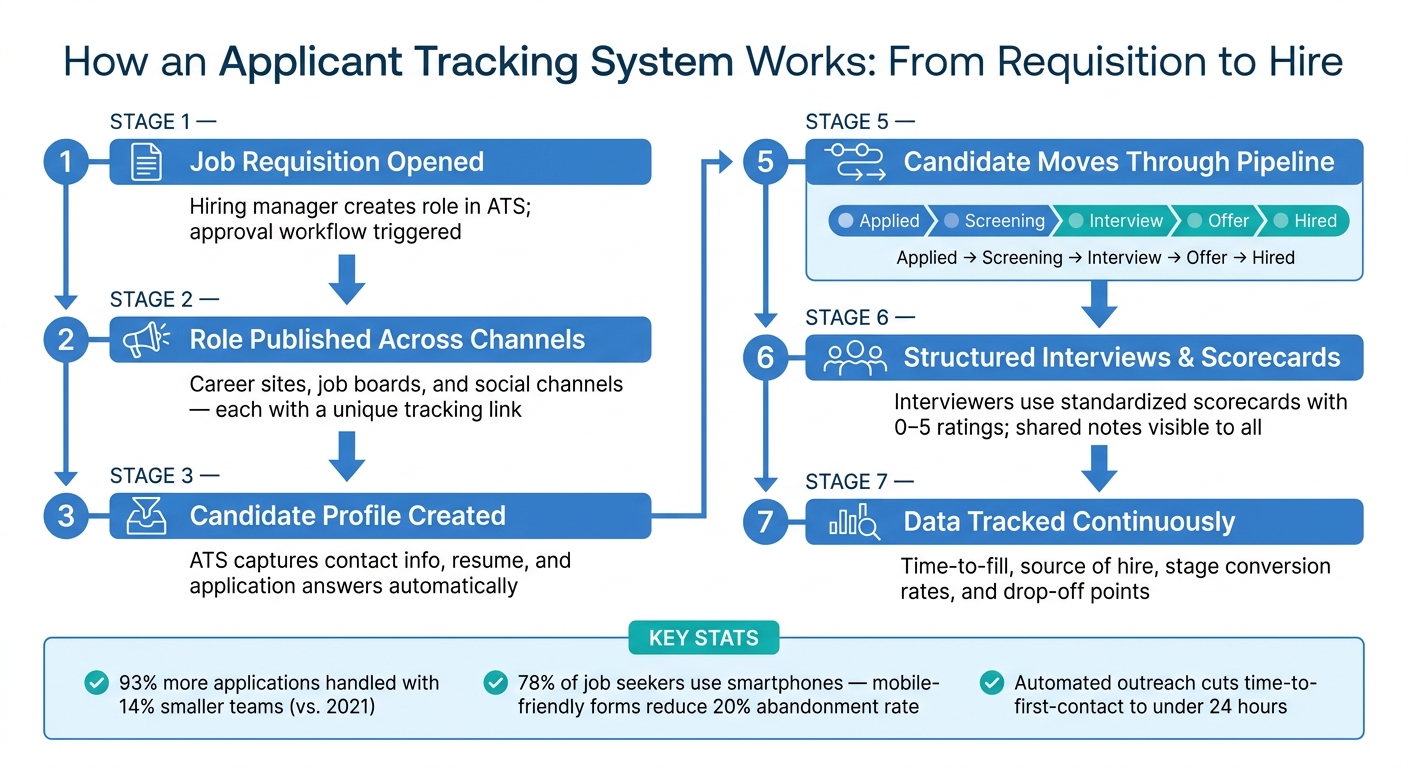
It starts when a hiring manager opens a job requisition in the ATS. After approval, the system publishes the role across career sites, job boards, and social channels. Each channel gets its own application link, so the ATS can track where every application came from automatically [2].
When a person applies, the ATS creates a candidate profile right away. It pulls in contact details, the resume, and answers to the application questions [4]. At that point, the system can screen the candidate and move them into the hiring pipeline.
Screening, Interviews, and Hiring Decisions
As applications come in, the ATS parses resumes, pulls out skills and work history, and shows a screening score [6]. It can also use knockout questions to filter out people who miss baseline requirements before a recruiter even opens the application.
After that, candidates move through a recruitment funnel: Applied → Screening → Interview → Offer → Hired. Everyone on the hiring team can see where each person stands. Interviewers use standard scorecards with set questions and 0–5 ratings, which helps the team evaluate people the same way each time [4]. In plain English, it cuts down on guesswork.
How ATS Data Improves Process Control
The ATS also keeps a running log of timestamps, source data, and stage changes. Timestamps show how long candidates stay in each stage. Source tracking shows which channels lead to hires. Stage conversion rates show where people tend to drop out.
That kind of visibility makes it easier to spot slowdowns early and adjust the process before small issues turn into bigger ones. The system also keeps communication records and compliance logs, which is a big part of why feature depth matters in day-to-day recruiting work.
Core ATS Features Hiring Teams Should Evaluate
Once your process is mapped out, the next step is simple: figure out which ATS features save time and give your team more control.
Features That Support Daily Recruiting Work
For day-to-day hiring, the best ATS features handle the repetitive stuff without making the process feel clunky.
A centralized dashboard lets recruiters see candidate status in one place. Job distribution helps teams publish roles across multiple channels from a single screen. Resume parsing pulls data from resumes automatically, which cuts down on manual entry. Automated messages handle routine updates, so candidates aren’t left waiting. Pairing the ATS with a smart application form also helps filter out mismatched candidates before they ever reach a recruiter’s queue.
Interview scheduling with calendar sync also removes a lot of back-and-forth. And automated outreach can cut time-to-first-contact to under 24 hours [8]. On top of that, internal notes and shared candidate evaluations help everyone stay on the same page.
Must-Have vs. Advanced ATS Capabilities
Start with the core tools first. Extra automation makes sense later, once hiring volume is high enough to justify the added cost and setup.
The table below separates everyday needs from features that tend to matter more for larger teams or heavier hiring demand.
| Feature | Must-Have | Advanced |
|---|---|---|
| Job posting distribution | ✓ | – |
| Resume parsing | ✓ | – |
| Candidate database management | ✓ | – |
| Basic interview scheduling + calendar sync | ✓ | – |
| Automated emails and status updates | ✓ | – |
| Team collaboration and internal notes | ✓ | – |
| Automated self-scheduling + video integrations | – | ✓ |
| AI-assisted candidate ranking | – | ✓ |
| Custom workflows | – | ✓ |
| Branded application experience | – | ✓ |
| Predictive analytics | – | ✓ |
Matching features to hiring volume and team size helps keep costs and complexity under control. That’s a big deal, because advanced AI add-ons can add $80,000 to $300,000 to total cost [7].
Where Recruitment Funnel Tools Add Value
Funnel tools matter at the very start of the hiring process. If fewer people finish the application, the ATS never gets the chance to do its job.
An ATS manages candidates after they apply. Funnel tools help more people reach that point. 78% of job seekers use their smartphones to find jobs, and weak mobile experiences can lead to a 20% candidate abandonment rate [6]. Smart forms and mobile-friendly interfaces reduce friction and help more qualified candidates complete the application.
Benefits, Limitations, and Common ATS Use Cases
Main Benefits for Recruiters, HR, and Hiring Managers
Once the applicant tracking system workflow is clear, the next step is simple: does it make hiring better enough to be worth the tradeoffs?
For most teams, the biggest upside is less admin work and more visibility. An ATS cuts down on back-and-forth, keeps hiring data in one place, and makes progress easier to track. HR teams can use real-time dashboards to monitor time-to-fill, source of hire, and diversity ratios [1]. For distributed teams, centralized workflows make it easier to source, engage, and assess candidates across locations and time zones [1].
That kind of visibility matters. It helps teams spot where candidates drop out of the funnel and respond faster before good people lose interest.
Clear candidate portals and timely updates can also improve response rates and reduce drop-off.
That said, none of this happens by magic. If the system is set up poorly, it can create new slowdowns instead of fixing old ones.
Common Limitations and Setup Risks
ATS platforms often rely on keyword matching, and that can be a problem. A strong candidate may use different wording than the system expects, which means their application gets missed even if they fit the role well [3]. Resume parsers can also struggle with complex formatting, causing key details to disappear or land in the wrong fields [3].
Another common issue is candidate drop-off. If the application is too long or works badly on mobile, qualified people may leave before they finish. That hurts conversion from application to interview, slows review, and can lead to missed talent [3].
Here’s the tradeoff in plain terms:
| Dimension | Benefit | Risk |
|---|---|---|
| Screening | Faster initial review and less manual effort | Keyword filters can discard qualified applicants [3] |
| Collaboration | Centralized workflows and shared candidate data [1] | Disconnected tools add manual work and slow handoffs [7] |
Popular ATS Tools and What They Are Known For
Not every ATS is built with the same focus. Some lean into structured hiring. Others put more weight on relationship-building or ease of use. So the right pick usually comes down to your team size, hiring pace, and how your recruiters like to work.
| Tool | Primary Emphasis | Best Fit |
|---|---|---|
| Greenhouse | Structured hiring & AI screening [1][5] | Mid-market to Enterprise |
| Lever | Candidate relationship management [5] | Scaling startups & Tech companies |
| Workable | All-in-one recruiting & job distribution [1][5] | SMB to Mid-market |
| Breezy HR | Visual pipeline & ease of use [5] | Small businesses & small teams |
Conclusion
Once you understand how an ATS handles the hiring funnel, the next move is picking one that fits your team. An ATS adds structure to a process that can get messy fast. It brings hiring work into one place, so teams spend less time chasing status updates and more time hiring. As hiring grows, an ATS helps keep things organized, measurable, and easier to move through.
The best ATS improves internal efficiency and keeps the candidate experience smooth. It works best when the workflow stays simple and the application process does too.
What to Consider Before Choosing an ATS
Start with your hiring volume and workflow needs. Look at your approval flow, compliance rules, and how much customization you actually need. The right ATS should fit your process, not force your team to work around the software. Recruitment agencies managing multiple clients should also weigh what to look for in a white-label ATS, since agency needs differ from in-house hiring teams.
It also helps to focus on shared access and live reporting. Faster handoffs and real-time pipeline data make bottlenecks in the hiring funnel easier to spot.
An ATS only helps after applications come in, so funnel quality still matters. Keep applications low-friction and mobile-friendly. Candidate experience has a direct effect on conversion and acceptance rates. It also makes sense to pick tools that show which channels bring in quality hires[2].
Choose the ATS that matches your hiring volume, workflow complexity, and candidate intake needs.
FAQs
Do small businesses need an ATS?
Yes. Small businesses can get a lot out of an Applicant Tracking System. It puts candidate data in one place, which cuts down on the mess of scattered emails, spreadsheets, and manual follow-up.
It can also automate resume parsing, make evaluations more consistent, flag hiring bottlenecks, and help teams give candidates a smoother experience. On top of that, it supports data-based decisions without piling on extra admin work.
Can an ATS reject qualified candidates?
Yes. An ATS can screen out qualified candidates when filters, knockout questions, or auto-screening rules are too strict. It can also happen when mismatched or incomplete data causes a person to be ranked too low or knocked out by mistake.
You can lower that risk by being careful with must-have criteria, keeping early disqualification to a minimum, and making the application process clear and short.
How do you choose the right ATS?
Start by looking at your hiring pain points, hiring volume, and team size. Tie that back to your business goals, then review your current HR tech stack so the ATS fits in cleanly and doesn’t cause headaches for your team.
Next, sort features by what matters most to you. That might include:
- Automation
- Analytics
- Compliance
- Reporting
Before you make a final call, bring recruiters into a pilot program. Their feedback can tell you a lot about day-to-day usability, the interface, and how the system works in practice.



Recruitment Agency Software: A Buyer's Guide
September 18, 2026[…] Bullhorn is an ATS and CRM platform built to handle both ATS and CRM workflows in one place. It carries candidate data from submission through placement and onboarding [1]. So when agencies size up Bullhorn, the big thing to look at is integration. If you’re unsure how an ATS fits into this picture, see our complete guide to applicant tracking systems. […]