
Talent Management Software: What It Does and Who Needs It
I’d consider talent management software when hiring, reviews, and employee development become hard to track – not just when your company grows. Start by checking where your team enters the same employee data twice.
These tools connect recruiting, onboarding, performance reviews, learning, succession planning, and internal moves. The focus is employee growth, not replacing payroll, an applicant tracking system (ATS), or your core HR records.
Here’s what I’d check before buying:
- Who needs it: HR teams with scattered records, managers tracking goals and skills gaps, and growing companies preparing future leaders.
- What you already have: Review your HRIS, ATS, and learning tools so you don’t pay twice for the same features.
- How it works: Test data syncing, permissions, reports, and everyday manager tasks. Keep people in charge of reviewing AI recommendations.
- What it costs – and delivers: Request estimates in U.S. dollars for setup, subscriptions, integrations, and training. Pilot one workflow, then compare results after 6–12 months.
My rule: Fix the workflow first, then choose the software. Small teams with simple needs may still be fine with access-controlled spreadsheets.
The Talent Management System in a Nutshell | AIHR Learning Bite
How Talent Management Software Supports Employees
Talent management software connects workflows across the employee lifecycle, from hiring to moves within the company.
| Capability | Workflows | Users | Result |
|---|---|---|---|
| Recruitment | Job postings, candidate records, interview scorecards, hiring approvals | Recruiters, hiring managers | Faster, cleaner hiring decisions |
| Onboarding | Documents, new-hire checklists, equipment and access requests | HR ops, new hires | First-day readiness |
| Performance management | Goals, check-ins, feedback, reviews | Managers, employees | Clear expectations and progress records |
| Learning and development | Skills records, training assignments, development plans | Employees, managers, L&D teams | Training matched to skills gaps |
| Succession planning | Critical roles, potential successors, readiness assessments | HR, managers, leadership | Readiness for future vacancies and internal moves |
Recruitment and Onboarding
Talent management software carries candidate data into onboarding, so teams have fewer scattered records and less duplicate data entry. Job descriptions can set success measures for the first 90 days, while new-hire checklists coordinate standard hiring forms, equipment, and access.
Automation keeps tasks on schedule, but HR still confirms they’re complete. Data gathered during hiring and onboarding also supports later performance and development decisions.
Performance Reviews and Employee Learning
Managers can link goals, check-ins, feedback, and reviews to an employee’s skills record. Structured scorecards or role requirements help them spot skills gaps and assign training.
The software tracks learning progress and development plans, while an LMS handles course delivery. These records also help guide promotion decisions and succession planning.
Succession Planning and Internal Mobility
As employees build skills and show results, their records help teams plan internal moves and prepare for future vacancies. Teams identify critical roles, record potential successors, and assess how ready each person is against the role’s requirements.
This work goes beyond executive roles. Managers use these records to evaluate internal moves and assign development actions.
Who Needs Talent Management Software?
Workflow complexity matters more than company size. Repeated data entry, inconsistent reviews, manual reporting, and limited visibility into skills are signs that spreadsheets may no longer be enough. Teams spread across locations or changing fast often need shared processes sooner.
HR Teams and Recruiters With Scattered Records
HR teams need a central system when onboarding status, review history, and development records are spread across spreadsheets and email. Before moving that data, standardize employee IDs, job titles, manager relationships, and review periods.
Shared skills data helps recruiters choose the fastest way to fill a gap.[10] Role-based access keeps records within the right groups: recruiters see candidate and requisition data, managers see approved team records, and employees see only their own.
Managers Tracking Goals and Skills Gaps
Managers need one place to track goals, feedback, and skill gaps without relying on HR for every update. Employee self-service also lets people update their goals, career interests, and development plans directly.
These records should support coaching. Promotion and pay decisions still need evidence gathered over time – not just one review.[8]
Growing Organizations Developing Future Leaders
As teams, locations, and management layers grow, informal knowledge-sharing starts to break down. Leaders need comparable records to spot skills shortages and address them through development or internal moves.[9]
For continuity planning, track critical vacancies, successor readiness, and development actions. Assign each action an owner and a deadline.[7]
Small businesses with stable hiring, simple reporting lines, and limited training may get by with access-controlled spreadsheets and documented processes until coordination becomes difficult.[7]
Talent Management Software vs. ATS, Payroll, and HRIS
Talent Management Software vs. ATS, Payroll, and HRIS
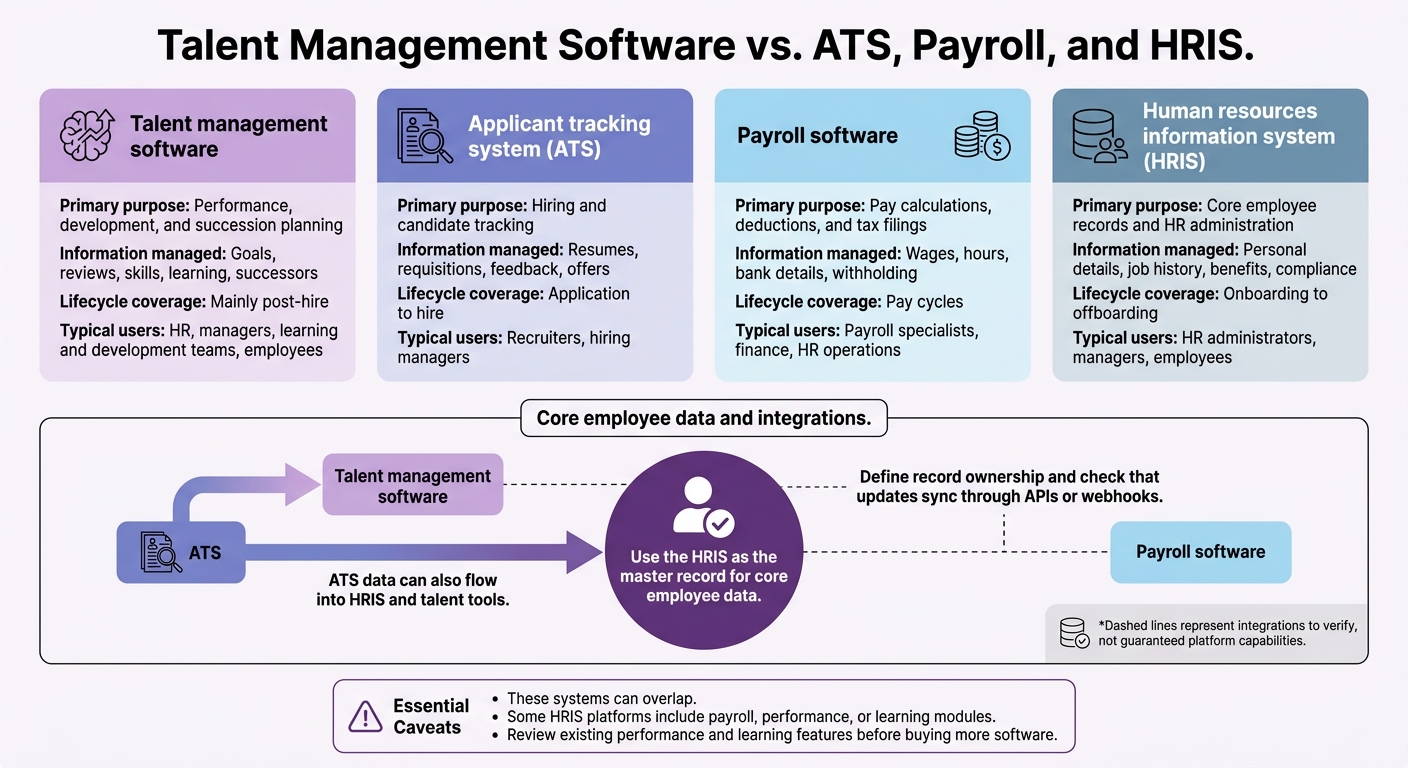
Talent management software focuses on employee growth after hiring: performance, learning, internal mobility, and succession planning. An ATS tracks candidates, payroll handles pay and taxes, and an HRIS stores core employee data.
| System | Primary purpose | Information managed | Lifecycle coverage | Typical users |
|---|---|---|---|---|
| Talent management software | Performance, development, and succession planning | Goals, reviews, skills, learning, successors | Mainly post-hire | HR, managers, learning and development teams, employees |
| Applicant tracking system (ATS) | Hiring and candidate tracking | Resumes, requisitions, feedback, offers | Application to hire | Recruiters, hiring managers |
| Payroll software | Pay calculations, deductions, and tax filings | Wages, hours, bank details, withholding | Pay cycles | Payroll specialists, finance, HR operations |
| Human resources information system (HRIS) | Core employee records and HR administration | Personal details, job history, benefits, compliance | Onboarding to offboarding | HR administrators, managers, employees |
These systems can overlap, so be clear about which one owns each record. Some HRIS platforms include payroll, performance, or learning modules. ATS data can also flow into HRIS and talent tools, reducing the need to enter the same information twice.[1][3][5] Before buying more software, review your existing performance and learning features so you don’t pay for tools you already have.[6]
Once you’ve defined system ownership, map how data moves between tools. Use the HRIS as the master record for core employee data, and check that updates sync through APIs or webhooks.[1][3][4][5]
Conclusion: Is Talent Management Software Right for You?
Talent management software makes sense when recruiting, onboarding, performance, learning, and succession rely on the same employee data. Its focus is post-hire development, not payroll or candidate tracking.
After comparing systems, use these signals to see whether the software fills a gap in your workflows.
| Organizational signal | Required capability | Evidence to review |
|---|---|---|
| Scattered records | One employee record | Sample records, duplicate handling, import/export formats, sync rules |
| Inconsistent reviews | Configurable review workflows | Templates, reminders, calibration, completion reports, review history |
| Skills gaps | Skills profiles, competency frameworks, assessments | Skills taxonomy, proficiency levels, assessment evidence, learning links, progress reports |
| No succession plan | Succession planning and internal mobility | Successor pools, readiness levels, development actions, access controls |
Once you’ve confirmed the fit, test how the platform handles your data and everyday tasks.
Check Data, Integrations, and Ease of Use
Decide which system owns employee, candidate, payroll, and learning data – and how updates sync between systems. During a live demo, test manager changes, department moves, candidate-to-employee conversion, and integration failures.
Check permissions, audit logs, retention rules, and report accuracy. Then have managers run a review and assign development actions.
Require human review of AI recommendations and bias testing. Ask which data informs those recommendations and how users can challenge incorrect outputs.
Before expanding, pilot one workflow with a representative group. Give the pilot a named owner, provide training, and set clear launch criteria.
If the workflow works for your team, examine the full cost and the results you expect.
Compare Costs and Track Results
Get written U.S.-dollar estimates for subscriptions, implementation, data cleanup, integrations, training, and admin time. Separate required costs from optional modules. Check renewal terms and export fees, too.
Before rollout, record onboarding completion, review participation, skills-gap progress, and successor readiness. Compare results after 6 to 12 months[11], along with manager and employee feedback.
Measure business impact – not just completed reviews or courses – with accurate data and consistent workflows.
FAQs
Which talent management workflow should we automate first?
Map your recruitment funnel to see where you’re losing the most time, candidates, or efficiency. Let those gaps guide which workflows you prioritize.
If screening is slow, interviews get delayed, or offers stall, focus on Applicant Tracking System (ATS) workflows: interview scheduling, status notifications, and resume parsing.
If you’re short on qualified applicants or struggling to engage passive talent, focus on CRM workflows, such as outreach sequences and talent pool segmentation.
How can we get managers to use the software?
Spell out managers’ responsibilities for interviews and feedback, including clear deadlines.
For example, set a deadline for feedback within 48 hours so managers can see how their actions affect hiring speed.
Give recruiters and managers shared access to records and live dashboards. This helps reduce duplicate work and confusion.
Pilot the software with managers, then use their feedback about day-to-day workflows to fix usability gaps.
How do we measure its return on investment?
Measure ROI by connecting talent management results to costs and value you can track in the system. Monitor cost-per-hire and time-to-hire alongside retention, tenure, and performance. Combine weighted retention and performance measures into a “quality of hire” score to measure value beyond faster processes [1].
Track reductions in administrative work and manual tasks, too. That includes time saved through onboarding automation, which lets your team focus on higher-impact work [2].