
How to Compare the Best Applicant Tracking Systems
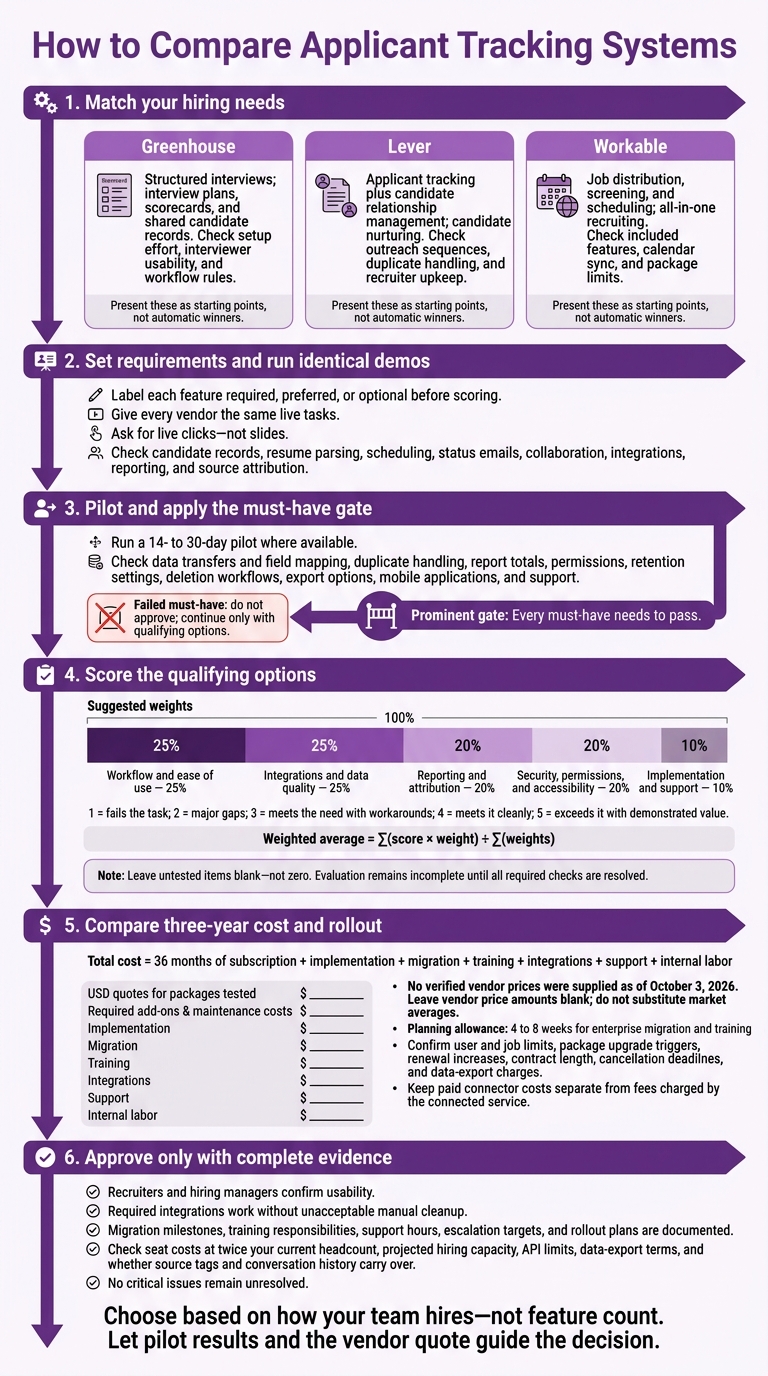
I’d choose from the best applicant tracking systems based on how your team hires – not their feature count. Start with Greenhouse for structured interviews, Lever for candidate nurturing, or Workable for job posting and all-in-one recruiting. Then test your must-have tasks and compare costs over 36 months.
I compare all three applicant tracking systems on candidate tracking, automation, integrations, reporting, ease of use, pricing, and growth limits.
Quick Comparison
| Platform | Main focus | What I’d check first |
|---|---|---|
| Greenhouse | Interview plans, scorecards, and shared candidate records | Setup effort, interviewer usability, and workflow rules |
| Lever | Applicant tracking plus candidate relationship management | Outreach sequences, duplicate handling, and recruiter upkeep |
| Workable | Job distribution, screening, and scheduling | Included features, calendar sync, and package limits |
My next step: give each vendor the same live tasks, then run a 14- to 30-day pilot where available. I’d check data transfers, report totals, permissions, mobile applications, and support – not just the sales demo.
Every must-have needs to pass. I’d use the article’s suggested weights – 25% each for workflow and integrations, 20% each for reporting and security, and 10% for implementation – to compare the remaining options.
No verified vendor prices were supplied as of October 3, 2026, so I’d request itemized USD quotes covering subscriptions, migration, training, add-ons, support, and internal labor before choosing.
How to Compare Applicant Tracking Systems
Best HR & Recruitment Software 2025: ATS Comparison
1. Greenhouse
Greenhouse is best suited to teams that want structured, repeatable hiring.[1][3]
Candidate Tracking and Talent Pools
Greenhouse stores notes, scorecards, and team feedback in one candidate record.[1] During the demo, ask how recruiters review past records, hand off candidates, and keep interviewers on the same page.
Hiring Workflows and Automation
Greenhouse’s structured interview plans take upfront setup, but they help interviewers evaluate candidates consistently.[1][3] This approach works best when hiring volume calls for consistent interviews across multiple hiring managers.
Ask how interview questions connect to scorecards and how feedback gets added to the candidate record. Check whether moving a candidate to the Interview stage triggers internal alerts and candidate emails – and who manages those rules.[1]
Integrations and Recruiting Analytics
Once you understand the workflow, check how Greenhouse connects to your other systems. Ask the vendor to show a data transfer to your HRIS or background check system, including what happens when a transfer fails.[2]
For reporting, confirm that unique application links credit the correct applicant source.[1] Test AI screening against your actual role requirements.[5]
Total Cost and Scalability
Greenhouse’s structured approach fits larger teams with structured hiring needs.[1][3] Admin workload matters as much as scale. Account for the internal time needed to manage setup, rules, and handoffs.
Request an itemized quote that covers implementation, migration, integrations, and add-ons. Use a 14- to 30-day trial to assess setup effort, ease of use for interviewers, and workflow handoffs before committing.[5]
2. Lever
Lever suits teams that want ATS tracking plus CRM-style candidate nurturing, with more focus on re-engaging their pipeline than on rigid interview structure.
Candidate Tracking and Talent Pools
Lever combines applicant tracking and candidate relationship management. Teams can manage applicants and reconnect with passive candidates in one system.[4] Ask the vendor to show how recruiters find a past finalist, review their record, and add them to a nurture sequence. Also check how the system detects duplicates through email addresses or LinkedIn profiles.[3]
Hiring Workflows and Automation
Lever supports automated email and SMS outreach, plus nurture sequences that keep past finalists and passive candidates engaged for future roles.[6][3] During the demo, confirm how it automates application confirmations, interview reminders, and rejection notices. Map the handoffs from sourcing to interviewing to help prevent missed follow-ups.[3][6]
Integrations and Recruiting Analytics
Check which connections are available for LinkedIn recruitment funnels, key job boards, and your HRIS.[3] For reporting, ask to see source effectiveness, funnel conversion rates, pipeline aging, and time-to-hire.[3]
Total Cost and Scalability
Lever is worth a closer look for high-growth startups.[4][1] Request a full cost breakdown covering subscription fees, implementation, maintenance, and upgrades.[2] As hiring volume grows, assign responsibility for maintaining talent pools, updating sequences, and resolving duplicates.
If broader job posting and all-in-one recruiting matter more to your team, compare those needs against the next platform.
3. Workable
Candidate Tracking and Job Distribution
Workable is the better fit if broad job distribution matters more than CRM-style nurturing. Recruiters can post a role once and send it to Indeed, LinkedIn, and industry job boards.[1][2] Check how an all-in-one ATS handles candidates after they apply, including automated screening.[1][2]
Hiring Workflows and Automation
Workable offers candidate self-scheduling and calendar sync with Google and Outlook.[2][3] Ask the vendor to walk you through how self-scheduling, screening questions, status updates, approval chains, and role-based permissions work – and how to configure them.[1][2] This walkthrough helps you see whether Workable can support a structured review process without adding admin work.
Integrations and Recruiting Analytics
Follow a job from distribution through application and source-to-hire reporting. Check which channels bring in applicants and lead to hires.[2] Then test the branded career site and application form on a phone to see what candidates experience on mobile.[2] Use these checks to decide whether the platform’s broader feature set is worth the cost.
Total Cost and Scalability
Request an itemized quote that covers the subscription, implementation, add-ons, and support over time.[2] Confirm which sourcing, scheduling, and reporting features are included, and whether costs increase as hiring volume grows.
Compare Pricing, Trade-Offs, and Growth Limits
Compare quotes from the best applicant tracking systems against your hiring volume, process complexity, and budget. No verified vendor quotes or advertised U.S. prices were supplied as of October 3, 2026. Leave those amounts blank instead of using general ATS market averages. Use the table to compare quotes on the same terms – not just the monthly subscription price.
| Platform | Advantage | Trade-off to assess | Quote items to confirm | Scaling limits |
|---|---|---|---|---|
| Greenhouse | Structured hiring may justify more setup work.[1][2] | Does process control justify the implementation effort? | Confirm implementation, migration, training, integrations, and support. | Users, active jobs, approval chains, reporting, and brands may require a different package. |
| Lever | CRM-heavy workflows need regular recruiter upkeep.[1] | Will recruiters maintain talent relationships, rather than only process applicants? | Confirm included CRM features, integrations, and support services. | More users, active jobs, or reporting needs may require a package change. |
| Workable | Bundled recruiting and job distribution can reduce add-ons.[1][2] | Do the bundled features match your hiring needs? | Confirm package limits and separately billed services. | Check whether jobs, users, locations, brands, or integrations increase the quote. |
Calculate total cost as 36 months of subscription plus implementation, migration, training, integrations, support, and internal labor. Allow 4 to 8 weeks for enterprise migration and training.[4]
Ask vendors – including white-label ATS providers – to document user and job limits, package upgrade triggers, renewal increases, contract length, cancellation deadlines, and data-export charges. Keep paid connector costs separate from fees charged by the connected service.
During the demo, ask these cost questions alongside workflow questions so you can see what the quoted price covers.
Test Integrations and Reporting in Vendor Demos
Once pricing narrows your shortlist of the best applicant tracking systems, use demos to check what each package actually does. Give every vendor the same live demo tasks, and verify integrations, reporting, and source attribution inside the product.[3][5] Test resume parsing and automated email handling, too.[1] Ask for live clicks – not slides.
Use the table below to record what each vendor shows. Request real-time dashboards for time-to-fill, source of hire, diversity ratios, and pipeline conversion rates.[1][2] Check that source attribution stays visible for social, referral, and job board leads.[1]
| Area | Greenhouse: verify | Lever: verify | Workable: verify | Evidence to request |
|---|---|---|---|---|
| Integrations | HRIS, job board, and communication tool connections | HRIS, job board, and communication tool connections | HRIS, job board, and communication tool connections | Connectors, field maps, sync direction, and package limits |
| Reporting and attribution | Hiring metrics and source tracking through candidate stages | Hiring metrics and source tracking through candidate stages | Hiring metrics and source tracking through candidate stages | Live dashboard, metric definitions, export totals, and a test record showing original source, campaign, and final source of hire |
Set your checklist before scoring. Score only features your hiring process needs, and label each one required, preferred, or optional before you start.[1][2] If your process depends on a feature, mark it required. A failed requirement shouldn’t disappear into an average.
Test controls as carefully as features. Run a 14- to 30-day trial with real candidate data to check field mapping, duplicate handling, and report totals.[5] Verify recruiter and hiring-manager permissions, retention settings, deletion workflows, and export options. Test the mobile application flow to make sure it’s short and easy to complete.[3]
Get implementation milestones, training responsibilities, support hours, and escalation targets in writing. Request an itemized quote for the package you tested, then use the same evidence to compare vendors on one scorecard – the same approach we recommend in our recruitment agency software buyer’s guide.
| Criterion | Suggested weight | Greenhouse score | Lever score | Workable score |
|---|---|---|---|---|
| Workflow and ease of use | 25% | – | – | – |
| Integrations and data quality | 25% | – | – | – |
| Reporting and attribution | 20% | – | – | – |
| Security, permissions, and accessibility | 20% | – | – | – |
| Implementation and support | 10% | – | – | – |
Score only after testing: 1 = fails the task; 2 = major gaps; 3 = meets the need with workarounds; 4 = meets it cleanly; 5 = exceeds it with demonstrated value. Calculate the weighted average as Σ(score × weight) ÷ Σ(weights). Leave untested items blank – not zero – and keep the evaluation incomplete until all required checks are resolved.
Choose From the Best Applicant Tracking Systems for Your Hiring Needs
Use the scorecard from the previous section to make your final choice between applicant tracking systems. Apply the same pass/fail criteria you used in demos: job distribution, parsing, candidate records, scheduling, status emails, and collaboration.[1][3] High-volume teams should also test nurture flows, talent communities, AI matching, and recruiter workspaces.[3]
Start with Greenhouse for structured evaluation,[2][1] Lever for pipeline nurturing,[1][4] or Workable for broad distribution and faster setup.[2][1] These are among the best applicant tracking systems to start with – not automatic picks. Let your pilot results and vendor quote guide the decision.
To turn your scores into a purchase decision, rate each finalist against the hiring problem you most need to solve. Complete this matrix separately for each system.
| Decision area | Evidence needed to approve |
|---|---|
| Requirements | Every must-have passes. Optional features cannot make up for a failed requirement. |
| Tested functions | Recorded results for your intake, approval, screening, and candidate-management tasks. |
| Integrations | Required HRIS and calendar sync connections work without unacceptable manual cleanup. |
| User feedback | Recruiters and hiring managers confirm that the interface is usable and the mobile experience works. |
| Implementation | A data migration timeline, training support, and a clear rollout plan are in place. |
| Three-year cost | Total cost in USD over three years, including subscriptions, implementation, migration, maintenance, and required AI add-ons. |
| Growth risks | Seat costs at twice your current headcount, projected hiring capacity, and clear data-export terms. |
| Open questions | No critical issues remain unresolved, including API limits and whether source tags and conversation history carry over. |
FAQs
How can I measure an ATS’s return on investment?
Measure ATS ROI by comparing hiring metrics before and after implementation. Track time-to-fill and time-to-hire, cost per hire when recruiting spend is connected, source of hire, stage conversion rates, and offer acceptance rate.
Also measure administrative time saved: an ATS can reduce administrative work by 30%–40%.
Use dashboards to spot hiring bottlenecks. Then weigh measured improvements against subscription, setup, migration, and integration costs.
How do I test AI screening for hiring bias?
Review the vendor’s documentation on model training and bias testing across demographic groups. Confirm that the tool aligns with EEOC guidelines and applicable regulations, such as NYC’s AEDT.
Run a 14- to 30-day trial using your hiring workflow and candidate data – not a canned demo. Check how well the tool matches candidates to each role and whether it relies only on job-related criteria. Keep human oversight in place, give administrators controls to turn AI on or off, and provide candidates with a clear option for human review.
How can I switch ATS tools without losing candidate data?
Check that your new ATS’s contract supports clean data imports and exports. Set up a sync to keep one shared candidate record, including source attribution, resumes, application materials, screening results, pipeline stages, interview history, notes, and conversations.
Use source-specific application links to keep attribution intact after handoff. Then run a trial migration with real candidate data to verify field mapping and check for data lost because of keyword or formatting issues.