



What Is a Recruitment CRM and How Does It Differ From an ATS?
Here’s the short answer: I use a recruitment CRM to build relationships with people before they apply, and I use an ATS to move applicants through hiring after they apply.
If I need to keep passive candidates warm, sort talent pools, track source data, and send follow-ups, I look at a CRM. If I need resume review, interview steps, feedback, offers, and compliance records, I look at an ATS. And if my funnel is weak on both sides, I need both.
A few points matter most:
- CRM = pre-application
- ATS = post-application
- CRM = relationship management
- ATS = hiring workflow
- CRM helps with passive talent, which matters because 73% of the global workforce is passive
- ATS helps with active applicants who are already in process
- Both work best together when candidate history, source tags, and handoff data stay attached to the same record
- Past databases matter: 46% of sourced hires in 2026 come from candidates already stored in a company database
If I’m trying to fix weak sourcing, poor follow-up, or cold talent pools, I start with the CRM side. If I’m trying to fix slow screening, interview delays, or offer-stage bottlenecks, I start with the ATS side.
Quick Comparison
| Criteria | Recruitment CRM | ATS |
|---|---|---|
| Main job | Attract and nurture talent | Process applicants |
| Candidate stage | Before apply | After apply |
| Focus | Relationships | Hiring steps |
| Best for | Passive candidates, talent pools, outreach | Screening, interviews, offers |
| Data structure | Reusable candidate records | Job-based applicant records |
| Reporting | Engagement, source quality, pipeline health | Time-to-hire, cost-per-hire, compliance |
| Good fit | Hard-to-fill roles, branding, re-engagement | High-volume hiring, structured workflows |
So when I compare the two, the split is simple: a CRM helps me build the pipeline, and an ATS helps me close it.
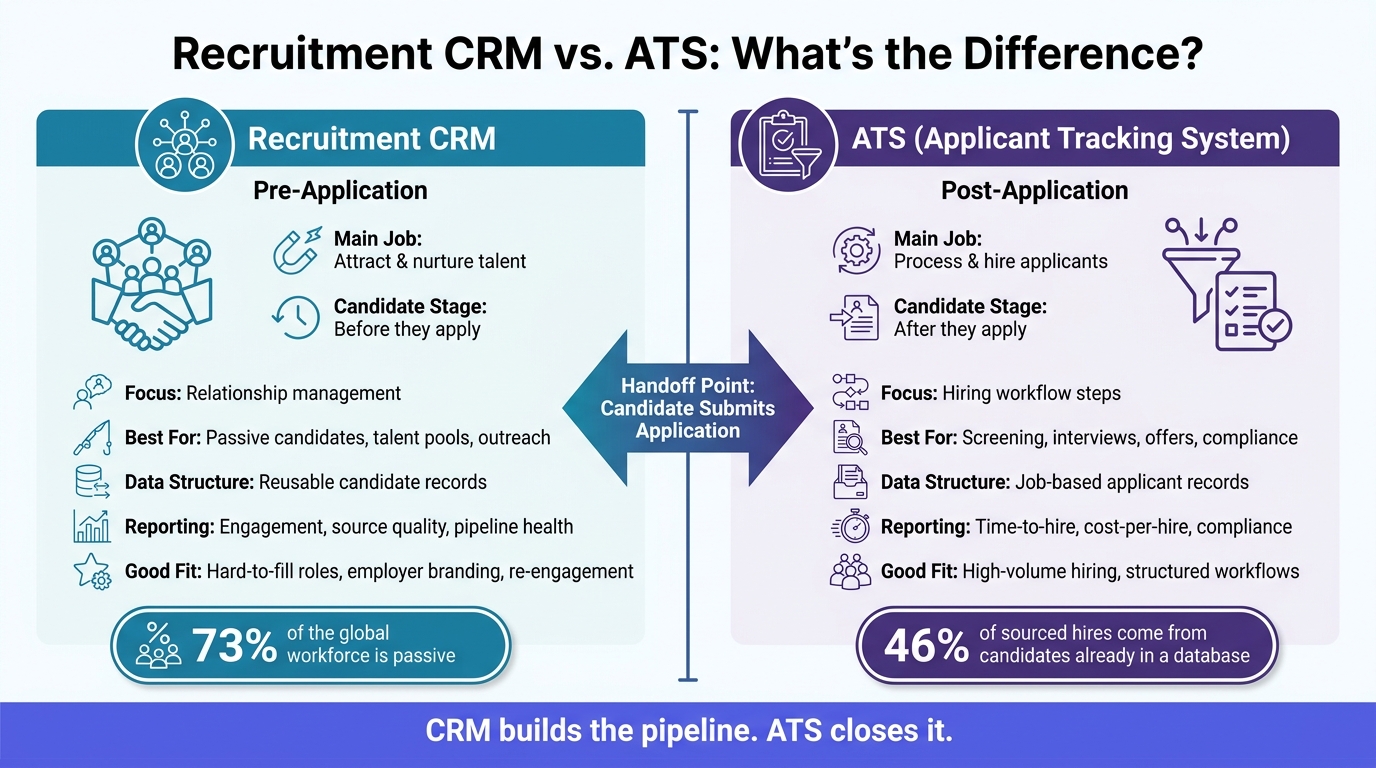
Recruitment CRM vs ATS: Key Differences at a Glance
Recruitment CRM vs. ATS: Side-by-Side Comparison
These two tools get mixed up all the time. That makes sense – they both deal with candidate data. But they’re built for different parts of the hiring process.
What a Recruitment CRM is built to do
A recruitment CRM helps recruiters organize, segment, and nurture people before they apply. It’s especially useful for passive talent.
In day-to-day work, that usually means recruiters can:
- Group candidates into segmented talent pools
- Run automated outreach campaigns
- Track candidate interactions and responses over time
The goal is simple: keep the relationship warm. A recruiter can build talent communities and send periodic culture updates long before a role even opens.
What an ATS is built to do
An ATS takes over after someone applies. It ties each record to a specific requisition and moves that person through screening, interviews, and offers.
In practice, that includes resume parsing, interview scheduling, collecting interviewer feedback, and extending offers. In short, it keeps the application process moving from first submission to hire.
Here’s how that split shows up in daily recruiting work.
Comparison table: Recruitment CRM vs. ATS
| Feature | Recruitment CRM | Applicant Tracking System (ATS) |
|---|---|---|
| Primary Purpose | Attract and nurture talent | Process and hire applicants |
| Candidate Stage | Pre-application (passive leads) | Post-application (active applicants) |
| Core Workflow | Sourcing, segmenting, outreach | Screening, interviewing, offer management |
| Communication Style | Ongoing, personalized campaigns | Transactional status updates |
| Talent Pooling | Segmented communities by skill or interest | Job-specific applicant records |
| Relationship Tracking | Candidate interactions and responses | Interview feedback and internal notes |
| Automation Type | Marketing-style re-engagement sequences | Scheduling reminders, status notifications |
| Reporting Focus | Source quality, pipeline health, engagement | Time-to-hire, cost-per-hire, compliance |
| Data Ownership | Recruiter-owned, reusable across roles | Requisition-owned |
| Best-Fit Use Case | Hard-to-fill roles, employer branding, passive sourcing | High-volume hiring, compliance-heavy processes |
In daily recruiting, the line is pretty clear: CRM tools handle nurturing, while ATS tools handle applications.
How Recruiters Use a CRM in Day-to-Day Work
A recruitment CRM helps teams organize, engage, and re-engage candidates before they apply. In plain English, this is the stage before the ATS steps in.
Talent pooling, segmentation, and relationship tracking
Recruiters build talent pools based on skill set, seniority, or source, such as a social campaign, a referral, or a past application. Each candidate can have one central profile with contact details, resume data, interview history, and notes.
That matters because recruiters don’t have to start from zero every time a new role opens. They can go back to a warm pool of people who already showed interest. In many cases, hires come from candidates already stored in the CRM.
Recruiters can also search those pools with Boolean filters. For example, (Java OR Python) AND ("backend engineer") can help surface the right profiles fast [4].
From there, recruiters can connect the right pool to new openings without a lot of manual digging.
Automated outreach and passive candidate re-engagement
A CRM is especially useful for passive candidates. Recruiters use automated follow-up sequences to stay top of mind instead of letting good people go cold.
One common move is to re-engage finalists from an earlier search when a similar role opens up. Because the CRM keeps past interactions and candidate details in one place, it’s much easier to bring those people back into the funnel.
Once interest turns into clear intent, the ATS can take over the application stage.
How a CRM supports recruitment marketing goals
A CRM links early-stage campaigns, like social ads and landing pages, to candidate data. When someone responds to an outreach campaign, that lead is routed into the CRM with a source tag attached. That gives recruiters a clearer view of which channels bring in qualified candidates, not just clicks [5].
Those same records also show when a candidate is ready to move from the CRM into the ATS. That handoff helps teams figure out whether they need a CRM, an ATS, or both.
When You Need a CRM, an ATS, or Both
Now that the CRM-vs.-ATS line is clear, the next step is simple: figure out where your hiring funnel gets stuck.
If the slowdown happens before people apply, you have an attraction problem. If applications are coming in but hiring drags during screening or interviews, you’re dealing with a post-application workflow problem. And in some cases, both parts of the funnel need help.
Choose a CRM when attraction and nurturing are the main gaps
A CRM makes sense when your main issue is building talent pools and staying in touch with people over time.
It’s a good fit for teams that run employer-brand campaigns on social media, keep “silver medalist” candidates warm for future openings [5][4], or build a talent community for roles they hire for again and again. It also helps when recruitment funnel metrics show too much dependence on agencies or job boards [3].
Choose an ATS when applicant processing is the main gap
If candidates are already applying but screening or interviews keep stalling, the bottleneck is processing.
That’s where an ATS comes in. It adds structure to the hiring process with scheduling, scoring, and compliance tracking. For small teams with lean recruiting capacity, that kind of automation can take a lot of pressure off day-to-day hiring work, especially for interview scheduling and status tracking [2].
Comparison table: Which system fits which hiring scenario
Use the table below to match each system to the hiring problem it solves.
| Hiring Scenario | Recommended System | Rationale |
|---|---|---|
| Passive sourcing for niche or technical roles | CRM | Niche candidates are often passive and need long-term nurturing [3][4] |
| Employer branding and social campaigns | CRM | Tracks campaign engagement and builds talent pools |
| Long-term talent community building | CRM | Keeps warm candidates organized for future re-engagement |
| High-volume hiring with steady applicant flow | ATS | Handles screening, scheduling, and scoring at scale |
| Urgent backfill roles | ATS | Prioritizes speed-to-hire for active candidates already in the pipeline [3] |
| Compliance-heavy hiring | ATS | Provides structured documentation, audit trails, and consistent workflow enforcement |
| Fast-growing teams hiring across multiple functions | CRM + ATS | Needs both attraction and processing support to avoid a leaky funnel [1][3] |
| Reactivating past applicants and finalists | CRM + ATS | 46% of sourced hires in 2026 come from candidates already stored in a company’s CRM or ATS database [5] |
That choice shapes how the candidate journey gets split across your systems.
How CRM and ATS Work Together Across the Candidate Journey
When CRM and ATS data sync, candidate movement stays smooth. The CRM builds interest before someone applies. The ATS takes over after the form is submitted. The big win is simple: candidate context stays with the record as it moves from one system to the other.
From first interaction to application handoff
A candidate may first find your company through a social media ad or a branded landing page. At that point, they enter the CRM as a lead. If they’re not ready to apply yet, they can stay in a talent pool and get nurturing outreach over time. Then, once they submit a form, their record moves from the CRM to the ATS as an active applicant. That handoff is the practical bridge between attracting people and hiring them.
Here’s what that looks like in practice:
| Journey Stage | System in Charge | Key Activities |
|---|---|---|
| First Touch | CRM | Social ads, landing pages, employer-brand content |
| Nurturing | CRM | Talent pooling, automated outreach, relationship tracking |
| Application Handoff | CRM → ATS | Candidate submits the form; the record syncs from CRM to ATS |
| Selection | ATS | Interview scheduling, candidate scoring, team collaboration |
Make the handoff automatic so you don’t end up with duplicate records or missing data.
How teams keep continuity between sourcing and hiring
The handoff only does its job if the ATS gets the candidate’s source data and conversation history too. After a candidate moves into the ATS, recruiters and hiring managers should still be able to see the full picture. That includes source attribution, conversation history, and segmentation tags from the CRM.
Without that context, follow-up gets messy fast. It becomes harder to tell how the candidate was engaged before applying, and it’s easier for communication to feel disjointed. One simple fix: use unique application links by source so the ATS keeps attribution data after the handoff.
FAQs
Can a recruitment CRM replace an ATS?
No. A recruitment CRM and an applicant tracking system do different jobs in the hiring process.
An ATS is the main system for handling active applicants and supporting compliance during hiring. A recruitment CRM is built for relationship-building with passive talent, candidate nurturing, and managing long-term talent pools before a role even opens.
How do I know if my team needs both systems?
Your team will likely need both if you want to shift from reactive hiring to proactive talent community building.
An ATS handles active applicants and tracks hiring metrics.
A CRM, on the other hand, helps you stay in touch with passive talent, build talent pools, and reconnect with candidates over time. That way, when a role opens up, you’re not starting from scratch. You already have a warm, qualified pipeline to work from.
What data should sync between a CRM and ATS?
To keep one shared candidate record, the CRM and ATS should sync contact information, resumes, application materials, screening results, pipeline stages, interview history, notes, and star ratings.
That way, candidate data stays consistent across both systems. It also cuts manual entry mistakes, reduces admin work, and gives recruiters instant access to the full context of each candidate’s journey.



Talent Acquisition Explained: Process and Tools
August 27, 2026[…] ATS handles active applicants. The CRM keeps passive talent engaged, allowing you to nurture relationships before candidates are ready to […]
Staffing Agency CRM: What to Look For
September 20, 2026[…] need a purpose-built ATS/CRM, not a generic sales platform [1]. That distinction matters because a recruitment CRM works differently than a standalone ATS, and knowing which one you actually need shapes the rest of this […]
Candidate Management Software: Features That Matter
September 23, 2026[…] pools, and nurture those connections with personalized communication, team collaboration tools, and CRM-style features that improve the candidate […]