

Recruiting Solutions: A Buyer’s Guide for HR Teams
Most HR teams shopping for recruiting solutions do not need more software. They need the right first layer for the hiring problem in front of them.
If I were buying recruiting tools today, I’d start with one question: Where is hiring getting stuck? This guide breaks recruiting solutions into seven tool types and ties each one to the job it does best: getting more applicants, reaching passive candidates, moving interviews faster, or screening people with less manual work.
Here’s the short version:
- Use an ATS if resumes are scattered and hiring steps are hard to track.
- Use recruiting landing pages and marketing tools if applicant flow is weak.
- Use a CRM if warm candidates go cold before they apply.
- Use AI sourcing tools if hard-to-fill roles need direct outreach.
- Use scheduling tools if calendar back-and-forth slows interviews.
- Use screening and assessment tools if too many weak-fit applicants move ahead.
- Use pricing, integrations, reporting, and EEO support to narrow your shortlist.
A few numbers make the stakes clear:
- 73% of the workforce is made up of passive candidates
- 79% of job seekers use social media during their search
- Recruiters are handling 93% more applications with teams that are 14% smaller than in 2021
- Strong employer branding is tied to 50% lower cost-per-hire and 28% lower turnover
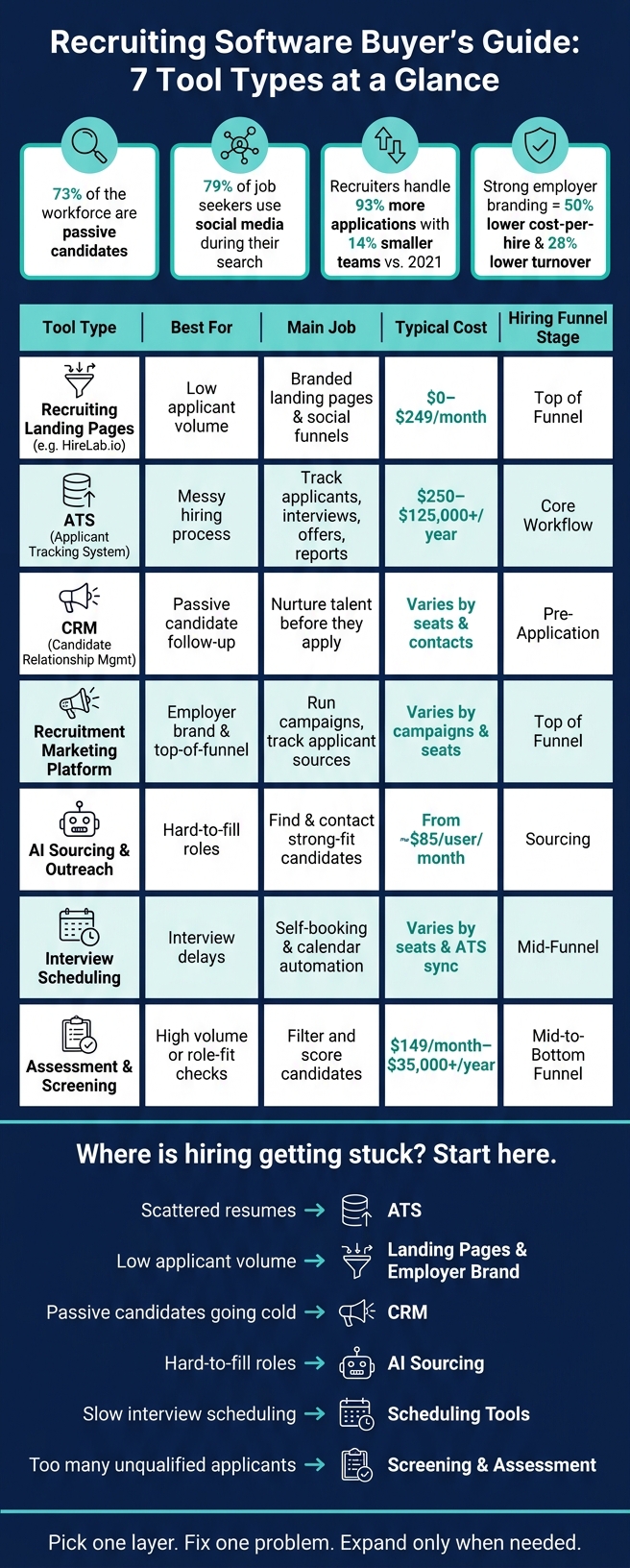
Recruiting Software Buyer’s Guide: 7 Tool Types at a Glance
Best Recruiting Software 2026: Top Platforms for Small, Midmarket, and Enterprise Organizations
Quick Comparison of Recruiting Solutions
| Solution type | Best for | Main job | Typical cost view |
|---|---|---|---|
| HireLab.io | Low applicant volume | Branded landing pages and social funnels | $0 to $249/month |
| ATS | Messy hiring process | Track applicants, interviews, offers, and reports | $250 to $15,000/year for many SMB and mid-market teams; enterprise can exceed $125,000 |
| CRM | Passive candidate recruitment | Nurture talent before they apply | Varies by seats, contacts, and automation |
| Recruitment marketing platform | Employer brand and top-of-funnel traffic | Run campaigns and track applicant sources | Varies by campaigns, seats, and analytics |
| AI sourcing and outreach | Hard-to-fill roles | Find and contact strong-fit candidates | Starts around $85/user/month |
| Interview scheduling | Interview delays | Self-booking and calendar automation | Varies by seats and ATS sync |
| Assessment and screening | High applicant volume or role fit checks | Filter and score candidates | Starts around $149/month; enterprise can top $35,000/year |
My takeaway: pick one layer that fixes the biggest bottleneck first. Then add more tools only when the team outgrows that setup.
1. HireLab.io
HireLab.io is an AI-powered recruiting landing page and funnel builder. Instead of sending people to a plain job post, you can turn a job URL into a branded, mobile-first landing page with smart application forms. It also plugs into LinkedIn, Meta, and TikTok, so HR teams can run social hiring campaigns and bring applicants into a funnel they control.
Hiring-Stage Fit
Among recruiting solutions, HireLab.io fits the top of the hiring funnel. If the main issue is low applicant volume, it focuses on sourcing, attraction, and that first interaction with candidates. The idea is simple: reach passive candidates through social campaigns instead of sitting back and waiting for inbound applications [2][3].
That approach can make a big difference. One logistics company swapped standard job ads for HireLab.io’s mobile-first, role-specific landing pages and saw a 3x increase in qualified applicants within the first week [4].
Pricing Model
| Plan | Monthly Price | Key Capabilities |
|---|---|---|
| Free | $0/month | 1 active funnel, free ATS (up to 50 applicants), AI page builder, smart forms |
| Optimize | $99/month | Up to 5 funnels, unlimited ATS applicants, custom domains, no HireLab branding |
| Advance | $249/month | 15 funnels, A/B testing, advanced analytics, external ATS integration, recruiter workspaces |
You can compare the current plans side by side on the HireLab pricing page.
Integration Depth
On the Advance plan, HireLab.io connects with external applicant tracking systems. In practice, that means it can act as a high-converting front end while still sending candidates into your current ATS. So you don’t have to rebuild your hiring process from scratch. You can keep the workflow you already use and replace a weak job-board link with a branded landing page you own.
The platform also supports tracking pixels. That gives teams more control over candidate data and campaign tracking across channels.
Compliance and Analytics
The Advance plan includes advanced analytics, which give recruiters a clearer view of page performance, drop-off points, and channel results. You can see which pages convert best and how one source stacks up against another. For hard-to-fill roles, A/B testing helps you test different brand messages or visuals to see what gets more candidates to apply.
Recruiter Workspaces are built for larger HR teams that need to separate roles, hiring managers, or business units without mixing everything together.
Once the landing page does its job, the next step is getting those applicants into an ATS without friction.
2. Applicant Tracking Systems (ATS)
An applicant tracking system (ATS) keeps all applicant data in one place and moves each candidate through every step of hiring. That includes applicant intake, interviews, offers, and reporting. If your team keeps missing follow-ups, losing sight of applicants, or burning time on manual data entry, this should move up the list fast.
Hiring-Stage Fit
An ATS fits the core hiring workflow, from applicant intake through interviews, offers, and reporting.
Pricing Model
This is where ATS tools often start to look very different.
For small teams, pricing usually runs from about $250 to $3,000 per year. Mid-sized organizations often land between $3,000 and $15,000 per year. Enterprise rollouts can cost more than $125,000, and that’s before implementation and support fees show up.
With recruiting solutions, the base price almost never tells the whole story. One detail matters more than many buyers expect: make sure clean data export is included before you sign. If it isn’t, switching vendors later can get expensive in a hurry.
Integration Depth
The first integrations to check in these recruiting solutions are the ones that keep hiring from getting stuck after a candidate says yes. HRIS and payroll connections help with post-hire handoff. Real-time calendar sync cuts down scheduling delays. Single Sign-On (SSO) helps with security and access control.
More advanced setups may also include background check providers, e-signature tools for Form I-9 and E-Verify, and vendor management systems (VMS) for contingent workforces.
| Integration Category | Essential Features | Business Impact |
|---|---|---|
| Administrative | Real-time calendar sync, SSO, open APIs | Fewer delays and less manual data entry |
| Post-Hire | E-signatures, background checks, payroll sync | Smooth transitions from hire to onboarding |
| Engagement | Integrated messaging (SMS, WhatsApp, email) | Faster responses and reduced candidate drop-off |
Compliance and Analytics
On the compliance side, look for audit trails, data protection tools, transparency for AI-driven decisions, and options for human review. Human review should remain part of the decision process.
For analytics, the metrics that tend to matter most are source effectiveness, pipeline conversion rates, and DEI reporting. Quality of hire is still tough to pin down. 89% of talent acquisition professionals say it’s becoming increasingly important, yet only 25% feel confident in their ability to do so [2].
Once the ATS brings order to applicant tracking, the next issue is keeping strong candidates interested between stages.
3. Candidate Relationship Management (CRM) Tools
An ATS tracks applicants. A recruitment CRM does a different job: it helps you reach people before they apply. For HR teams, the point isn’t just storing contacts. It’s turning cold or dormant talent into people you can hire when the right role opens.
Hiring-Stage Fit
CRMs sit between sourcing and application. They help teams stay in touch with passive talent, keep interest alive, and build trust until an opening shows up. In plain terms, a CRM is for finding, attracting, and nurturing talent before someone becomes an applicant.
That matters because 73% of the global workforce consists of passive candidates who are not active on job boards but are reachable via relational tools like CRMs [2]. And the payoff isn’t small. Candidates sourced through proactive relationship-building are 8x more likely to be hired than those applying through job boards [3].
There’s another big upside here. 46% of sourced hires in 2026 come from candidates already in your database [3]. So if your team keeps a clean, active CRM, you’re far less likely to lose track of strong people you’ve already met.
This work also ties straight to cost and retention. Companies with active talent communities see a 50% reduction in cost-per-hire and 28% lower turnover [2]. That’s a strong return, especially when average non-executive cost-per-hire is around $1,200, while executive roles can hit $10,625 [2].
Pricing Model
CRM pricing usually depends on a few core things:
- Number of seats
- Contact volume
- Automation features
- Branding options
Before you buy any of these recruiting solutions, check the limits on talent pools, outreach volume, and integrations. A low starting price can look good at first, then get expensive once your database or campaigns grow.
Integration Depth
Good CRM tools should connect with your ATS, email, and calendar. Tracking-link support also helps, since it lets outreach data flow into pipeline reports instead of living in a separate silo.
The real test is simple: does CRM activity show up cleanly inside ATS reporting? If it doesn’t, your team may end up guessing which outreach efforts led to interviews and hires.
Compliance and Analytics
On the compliance side, look for consent management, clear data retention rules, and support for EEOC, CCPA, and GDPR workflows. The focus should stay on consent, retention, and governance for nurture lists.
For analytics, a few metrics tend to matter most:
- Pipeline growth over time
- Engagement rates by outreach channel
- CRM-sourced candidates who later convert to hires
Once a CRM builds the talent pool, recruitment marketing platforms can turn that audience into active campaign traffic.
4. Recruitment Marketing Platforms
Recruitment marketing platforms help you reach people before they apply. They use social campaigns, branded landing pages, and targeted content to build Awareness, Interest, and Consideration. In plain English, they work at the top of the funnel.
But impressions alone don’t tell you much. The main thing to watch is whether those campaigns turn into measurable applicant flow.
That matters because most candidates are passive. They’re not sitting on job boards all day. You have to get in front of them earlier. Social platforms play a big part here: 79% of job seekers use social media during their job search, and that climbs to 86% among people in the first 10 years of their career [2]. For Gen Z, the signal is even stronger: 95% say a company’s social media presence affects their decision to apply [2].
Hiring-Stage Fit
Put a recruitment marketing platform near the top of your list when you need to reach passive candidates, build employer brand visibility, or hire for niche roles. The payoff can be big. Companies with strong employer branding see a 50% reduction in cost-per-hire and 28% lower turnover [2].
When comparing options, look at the parts that shape control, visibility, and reporting:
- Audience targeting
- Branded pages
- Data ownership
- Attribution
- Campaign control
Pricing Model
When comparing recruiting solutions in this category, check pricing tiers based on campaign volume, landing pages, analytics, integrations, and seats. That gives you a clearer view of what you’re paying for.
After that, integrations become a big deal. If campaign data doesn’t flow into your ATS cleanly, reporting gets messy fast.
Integration Depth
The ATS connection matters most here. Look for solid ATS sync and trackable application links so source-to-hire reporting stays clean. Some platforms also use AI to adjust targeting and budgets in real time, which can help you get more from your ad spend.
Compliance and Analytics
For social outreach, use clear privacy notices, consent tracking, and data-retention rules. That keeps outreach data easier to manage and lowers risk.
On the analytics side, keep your eye on metrics that tie back to hiring results:
- Source-of-hire
- Quality-of-hire
- Cost-per-hire by channel
When marketing starts filling the funnel, the next step is figuring out how fast your team can source and engage the strongest candidates.
5. AI Sourcing and Outreach Tools
Once campaigns and nurture lists start bringing in interest, AI sourcing tools help recruiters find and reach strong-fit candidates with less manual work. They search, rank, and contact qualified people on their own, which helps teams move faster on hard-to-fill roles. That matters when the talent pool is thin and specialized jobs are sitting open.
Hiring-Stage Fit
Of all the recruiting solutions here, AI sourcing tools make the most sense for hard-to-fill roles where manual sourcing just can’t keep up. Candidates reached through direct AI-driven outreach are 8x more likely to be hired than those sourced from traditional job boards [3]. In plain terms, these tools are best when speed and precision matter more than sheer volume.
Pricing Model
Smaller teams often pay a monthly subscription that starts at about $85 per user per month. But that’s not always the whole bill. Some platforms tack on usage-based fees tied to placements or job posts, and those costs can pile up fast during busy hiring stretches.
Integration Depth
Look for tools that automatically sync candidate profiles, outreach history, and engagement data into your ATS or CRM. That keeps reporting clean and cuts out manual exports. But sync alone isn’t enough. The platform should also support consent tracking, audit trails, and bias controls.
Compliance and Analytics
For HR teams, transparency and audit logs matter just as much as speed. Focus on consent, bias controls, and audit logs, especially as rules like NYC’s Local Law 144 require bias audits for automated employment tools. AI sourcing only pays off when it improves hire quality, not when it merely pumps up response volume.
A few metrics tell the real story:
- Quality of hire
- Response rate
- Interview-to-offer conversion
The next question is how fast those candidates can be scheduled and screened.
6. Interview Scheduling Platforms
Once you’ve found strong candidates, the next choke point in the recruitment funnel is simple: getting them into an interview.
Scheduling-focused recruiting solutions cut out the endless back-and-forth by giving candidates self-booking links and sending automated reminders. That means fewer calendar conflicts, fewer no-shows, and less drop-off. And this step matters more than it may seem. Candidate experience at this stage can shift offer acceptance by more than 70% [1]. If your team already uses an ATS, this also removes one of the last manual tasks before the interview starts.
Hiring-Stage Fit
Bring in scheduling tools when recruiter volume makes manual calendar coordination hard to keep up with. Recruiters are handling 93% more applications with teams that are 14% smaller than in 2021 [2]. At that point, calendar wrangling stops being a small annoyance and starts eating real time.
Integration Depth
At a bare minimum, the platform should sync with your calendar and ATS so bookings update candidate records on their own. The better options go a step further and send an interview invite the second a candidate’s status changes in the ATS, with no extra click from the recruiter [1].
If your team gets a lot of applicants through mobile-heavy channels like social media, self-booking links also need to work well on phones. That’s a big deal when candidates are applying through TikTok or Instagram [2].
Compliance and Analytics
A few numbers will tell you fast if your scheduling flow is doing its job:
On the compliance side, make sure the platform logs all candidate communications. That record supports EEOC documentation and internal reporting.
Once interviews are booked, the next question is whether candidates pass screening cleanly.
7. Assessment and Screening Tools
Once interviews are on the calendar, the next job is simple: figure out who’s worth more time. Assessment and screening tools help turn a pile of applicants into something you can actually use. They support screening, evaluation, and final selection, and they matter most when applicant volume is high or the role is hard enough that manual review starts to break down.
Hiring-Stage Fit
The right place to use these recruiting solutions depends on the bottleneck in your hiring funnel. Some help most at the top, where teams are dealing with sheer volume. Others matter more in the middle or at the end, where judgment, consistency, and compliance carry more weight.
| Funnel Stage | Tool Type | Problem Solved |
|---|---|---|
| Top (Sourcing/Screening) | Resume parsers / chatbots | Volume crisis; manual review fatigue – high priority for high-volume roles |
| Middle (Evaluation) | Skills tests / AI video | Missing technical or soft skill data – high priority for specialized roles |
| Bottom (Selection) | Structured scoring / background checks | Subjective bias and compliance risk – critical for all roles |
So tool choice should follow role type, not volume alone.
Initial resume review can cut screening time by 50% to 70% [1]. Companies using these tools also report a 30% reduction in cost-per-hire and a 25% reduction in time-to-fill [2].
Pricing Model
Basic AI screening starts at about $149/month, while enterprise tools can run past $35,000 per year [2]. Per-candidate pricing can get expensive fast when volume climbs. That’s why flat-rate or unlimited-user contracts often make more sense. Before you sign for any of these recruiting solutions, base the plan on your monthly applicant volume.
Integration Depth
Assessment tools should send data back into your ATS on their own. If they don’t, recruiters end up doing manual entry, which slows everything down and leaves more room for mistakes.
The best setups fire off assessments as soon as a candidate hits a set ATS stage. Then the scores flow straight into the candidate profile. No chasing data. No spreadsheet shuffle.
Compliance and Analytics
This is the point where these tools either sharpen hiring decisions or pile on risk. Only buy tools that give you auditable scoring and a documented review path. Rules like NYC Local Law 144 and the EU AI Act are pushing vendors to show transparent, auditable AI models to ensure fairness [2].
It also helps to track whether assessment scores line up with interview performance and offer acceptance. That’s the part many teams miss. A score looks good on paper, but does it predict anything useful?
With screening set up, the next step is deciding how to balance fit, speed, and team workload across your full set of recruiting solutions.
Recruiting Solutions: Pros and Cons by HR Team Scenario
The right recruiting stack comes down to one thing: what slows your team down most. For some teams, it’s applicant volume. For others, it’s candidate follow-up or cross-team coordination.
This side-by-side view matches recruiting solutions to three common U.S. hiring setups.
| Scenario | Best-Fit Solution Types | Advantages | Tradeoffs | Budget Impact |
|---|---|---|---|---|
| Small HR Team | Basic ATS, job boards, recruitment landing pages | Low entry cost, fast setup, immediate applicant reach | High manual effort, limited employer branding, data silos | $250–$3,000/year |
| Growing Team | Mid-tier ATS, automated scheduling, recruitment marketing | Automated workflows, better candidate experience, predictable pipeline | Requires content strategy and setup time | $3,000–$15,000/year |
| Enterprise | Enterprise ATS, CRM, AI sourcing, assessment tools | Massive scalability, bias reduction, deep analytics | Harder to deploy and maintain | $125,000+ upfront |
For small teams, simple usually wins. A low-cost setup that pulls applications into one place and doesn’t take weeks to launch can save a lot of hassle. The downside is pretty clear: more hands-on work and less control over branding and reporting.
For growing teams, automation starts to matter a lot more. Scheduling tools, recruiting marketing features, and a mid-tier ATS can cut back on back-and-forth and help build a steadier passive-candidate pipeline. You do, however, need time to set things up and keep content flowing.
For enterprise teams, the focus shifts to control. Integrated recruiting solutions with stronger compliance support, analytics, and governance make more sense when multiple teams, locations, or business units are involved. These setups can handle scale, but they also take more work to roll out and manage.
If you want the short version of how to pick recruiting solutions by team size, it looks like this:
- Small teams: prioritize simplicity
- Growing teams: prioritize workflow automation
- Enterprise teams: prioritize control and integration
Conclusion
Recruiting solutions get much easier to buy when you begin with one question: Where is the hiring bottleneck?
That point of view makes the rest of this guide pretty simple. First, find the bottleneck. Then, match it to the right layer.
Use this map to choose the first layer of your recruiting solutions, not your full stack.
| Hiring problem | Start with this layer |
|---|---|
| Scattered resumes and weak data control | ATS |
| Low applicant volume or weak employer brand | Employer brand and landing pages |
| Struggling to reach passive candidates | Social sourcing |
| Losing warm candidates between applications and offers | Candidate relationship management (CRM) |
| Slow, back-and-forth interview scheduling | Interview scheduling |
| Too many unqualified applicants moving forward | Screening and assessment |
Start with the layer that fixes your biggest hiring bottleneck. Automate the step that eats up the most time.
Pick one layer. Fix one problem. Expand only when needed.
FAQs
How do I find our main hiring bottleneck?
Map your recruitment process inside your applicant tracking system and track conversion rates at each stage. Keep an eye on metrics like application completion rate, time to shortlist, and interview-to-offer ratio so you can spot steep drop-offs fast.
If candidates are dropping off during the application stage, the issue may be a form that’s too long or hard to use on mobile. If the slowdown shows up during screening or interviews, put your attention on automating manual work and speeding up communication.
Which recruiting tool should we buy first?
Start with your biggest bottleneck, not some preset order. A time-to-hire calculator can show you where candidates drop off and where the process slows to a crawl.
- If you’re dealing with high application volume and manual screening, start with an ATS.
- If the main problem is coordination, start with an interview scheduling tool.
- If your funnel is leaking, start with a job landing page builder.
What integrations matter most before we buy?
Prioritize integrations that turn your hiring stack into one central hub. The goal is simple: cut manual data entry and keep candidates from slipping through the cracks.
Focus on these areas:
- Sourcing and marketing: multi-channel job distribution and social media sync
- Engagement: SMS and WhatsApp sync
- Scheduling: real-time Google Calendar or Outlook sync
- Administrative and data: APIs for HRIS, payroll, background checks, plus SSO and smooth data flow from application to onboarding
If those pieces work well together, your team spends less time copying data from one tool to another and more time moving people through the hiring process.